New Feature
This release introduces a complete redesign of the Special Charges feature, enabling property managers to create flexible, multi-resident billing scenarios with enhanced invoice management capabilities. The new system supports custom charge allocations, improved draft workflows, and a modernized user interface.
Key Features
Enhanced Setup Options
Invoice Number Management
- Auto-generated invoice numbers with manual edit capability
- Unique invoice numbers generated automatically for each billed resident
- Incremental suffixes or unique IDs for multiple resident invoices
Issue Date Configuration
- Default to current date with edit capability
- Flexible date selection for billing scenarios
Identifier Field
- Free-hand text field supporting up to 150 characters
Advanced Invoice Line Items
Item Management
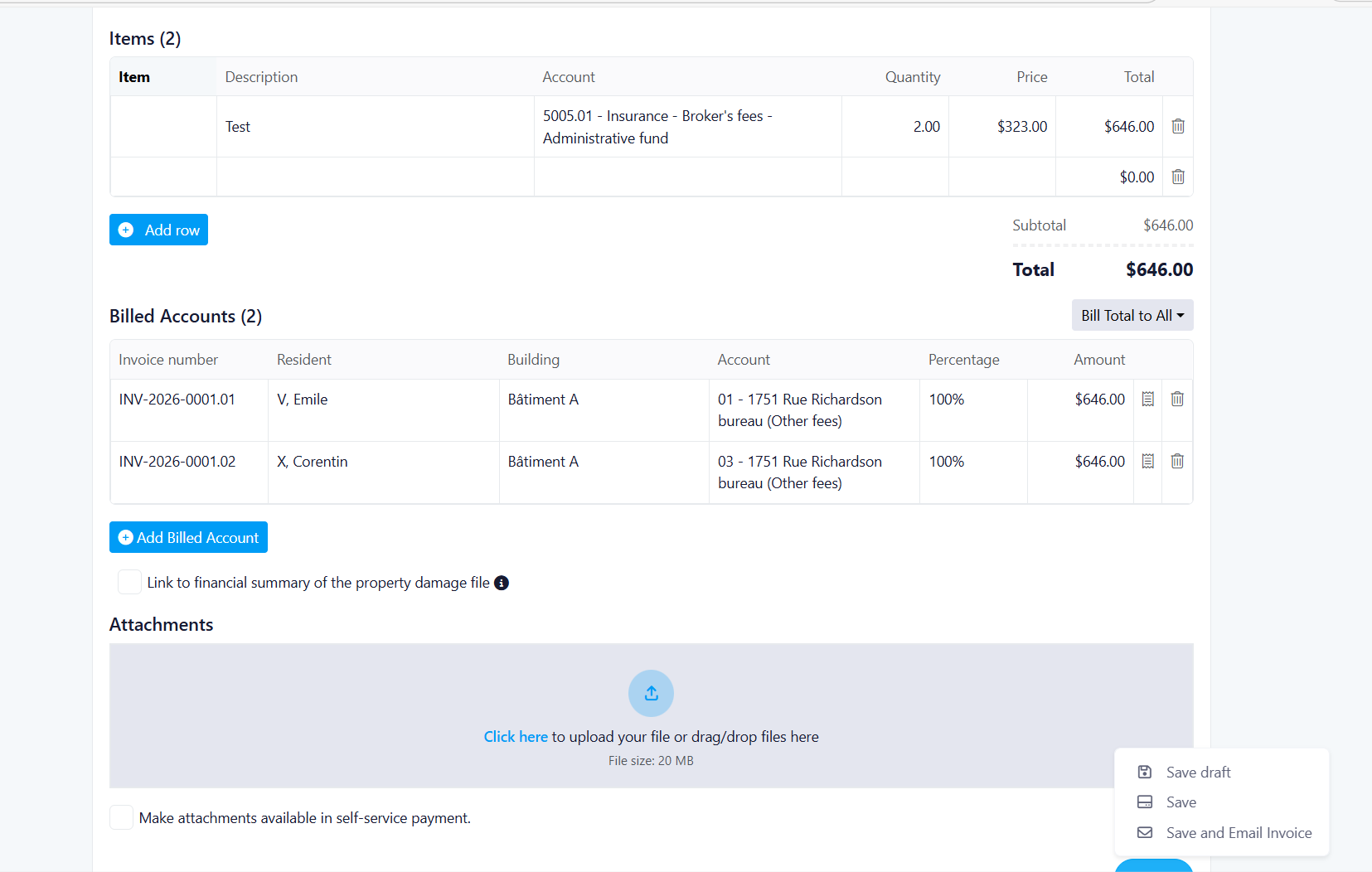
- Support for up to 20 different line items per invoice
- Add Row functionality for dynamic item addition
- Custom/Freehand option for creating items without predefined templates
- Full editability of line items before submission
- Item inventory system for reusable charge templates
Tax Configuration
- Tax Exclusive method (same as current behavior)
- Line-item level tax rate selection
Create and Manage Items
Item Creation
- Create reusable items stored for future invoices
- Add items by selecting from available inventory
- Create new items on-the-fly
Flexible Account Configuration
Account Selection
- Dropdown menu to select creditor for each line item
- Editable after initial entry
- Reads originally entered values with edit capability
Multiple Billing Methods
Option 1: Bill Total to All (Existing Behavior)
- Entire total split evenly among all selected accounts
- Maintains current system functionality
Option 2: Bill Different Amounts to All
- Enter specific amounts for each user
- **Validation Rules**:
- Total billed cannot exceed original total value
- Every user must have an amount entered (cannot be blank)
- Default amount is 0 when option is selected
- Real-time validation with color indicators:
- Red: Total exceeds original amount
- Yellow: Total is less than original amount
- Green: Total matches original amount
Option 3: Divide Equally
- Automatically divides total equally among all users
- System sets percentage automatically (e.g., 50% for 2 residents)
- Read-only percentage display
- Example: $100 total ÷ 10 accounts = $10 per account
Invoice Preview Feature
Dynamic Preview
- Real-time preview of generated invoices
- Preview updates based on:
- Selected residents
- Chosen percentage and split options
- Total and itemized amounts
- Available when billing percentage = 100%
- Helps property managers verify invoice accuracy before sending
Invoice Attachment Management
Attachment Functionality
- Use same business rules as current system
- Support for multiple attachment types
- Maintained compatibility with existing attachment workflows
Improved Save and Send Options
Current State
- Users send invoices from bottom of page
- Standard email composition interface
New Save Options
Scenario 1: Save a Draft
- Stores all entered data for special charge
- No database records updated (no impact on balances/accounts)
- Draft can be reopened later for continued editing
Scenario 2: Save (No Email)
- Updates special charge record with entered information
- No email sent to recipients
- Functions exactly as current "Save" option
Scenario 3: Save and Email
- Updates special charge record
- Triggers redesigned popup for email confirmation
- Follows updated UI/UX design guidelines
Billing Scenarios
Scenario 1: Single Resident Billed 100%
All costs charged to one resident
Process:
1. Property Manager selects resident (e.g., Emily)
2. Manually enters total amount ($2,250)
3. Selects "Bill Total to All" option (existing behavior)
4. Percentage beside user's name shows 100% (read-only)
5. Enters invoice number (manual or auto-generated)
6. Preview shows invoice appearance when clicking invoice icon
Result:
- One invoice PDF generated for Emily totaling $2,250
- Invoice lists all items with amounts and percentage (100%)
- Each line item shows: Item, Amount, % of share
Invoice Export:
- Save configuration (resident allocations, percentages, items)
- "Export Invoice" button available after saving
- Downloads or generates PDF copy of invoice(s)
- Follows new template design
Scenario 2: Equal Split Between Two Residents
Two residents share total amount equally
Process:
1. Property Manager selects Emily and Jordan
2. Chooses "Divide Equally" from dropdown
3. System automatically sets 50% for each user (read-only)
4. First invoice number entered by Property Manager
5. Subsequent invoices auto-generated with incremental suffixes/unique IDs
6. Every preview invoice has unique invoice number
Result:
- Two invoices generated:
- Emily: $1,125
- Jordan: $1,125
- Each invoice displays same items with split totals
- Each invoice shows original amounts in line items
- Clearly indicates what residents will pay (items, description, percentage, amounts due)
Invoice Details Show:
- Items
- Description
- Full total
- % Resident's billed portion
- Total after % due for each line item and total
Export Format:
- Consistent layout and spacing across all residents' invoices
Important Note: Discrepancy in charges will charge the first billed person
- Example: $10 ÷ 3 = $3.33
- Person 1: $3.34, Person 2: $3.33, Person 3: $3.33
Scenario 3: Custom Split Between Multiple Residents
Three residents share costs by different percentages
Process:
1. Property Manager selects Emily, Jordan, and Daniel
2. Selects "Bill Different Accounts" from dropdown
3. Manually enters custom percentage for each user OR enters amount (updates custom percentage)
4. System validates total percentage = 100%
5. Backend calculates amount per user based on percentage
Example Allocation:
- Emily: 40% = $1,000
- Jordan: 5% = $200
- Daniel: 55% = remainder
Validation:
- System ensures total percentage = 100%
- Display remaining to allocate percentage
Result:
- Three separate invoices generated
- Each shows itemized costs multiplied by user's percentage
Benefits:
Flexibility: Support for multiple billing scenarios (single, equal split, custom split)
Transparency: Clear preview of invoices before sending
Accuracy: Real-time validation ensures correct charge allocation
Efficiency: Draft saving allows work-in-progress management
Control: Property managers can customize amounts per resident
Visibility: Enhanced preview functionality for better decision-making
Was this article helpful?
That’s Great!
Thank you for your feedback
Sorry! We couldn't be helpful
Thank you for your feedback
Feedback sent
We appreciate your effort and will try to fix the article