First Week Of The Month
New Features
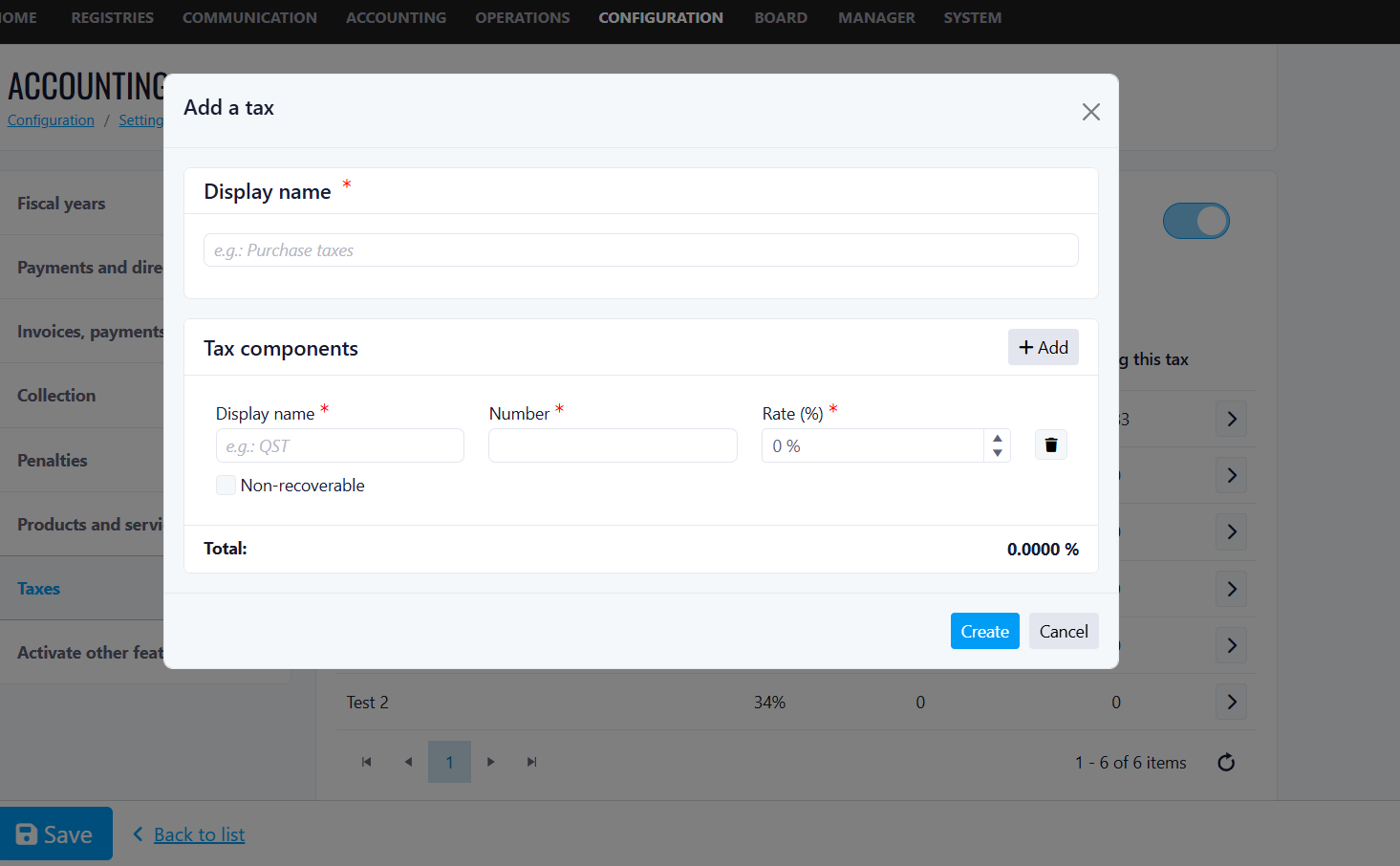
Taxes Display
Tax ID Number Field: A new required field, Tax ID Number, has been added to the Tax Components section within the Add a Tax dialog.
This field allows users to associate a government-issued or internally defined tax identification number with each tax component for improved compliance tracking and reporting.
This change applies to new entries only. Existing tax records created prior to this release are not affected and will continue to function as expected. No migration of historical data is required.
How to Use:
1. Navigate to the Taxes settings module.
2. Click 'Add a tax' to open the dialog.
3. Enter a Display Name for the tax (e.g., Provincial Sales Tax).
4. Under Tax Components, fill in the Component Display Name, Tax ID Number, and Rate (%).
5. Optionally check 'Non-recoverable' if applicable.
6. Click 'Create' to save the new tax. The entry will be available immediately for new transactions.
Benefits
- Regulatory Compliance
- Improved Reporting
- Audit Trail
- Better Customer Transparency
EV/Notes Vehicle Label Feature
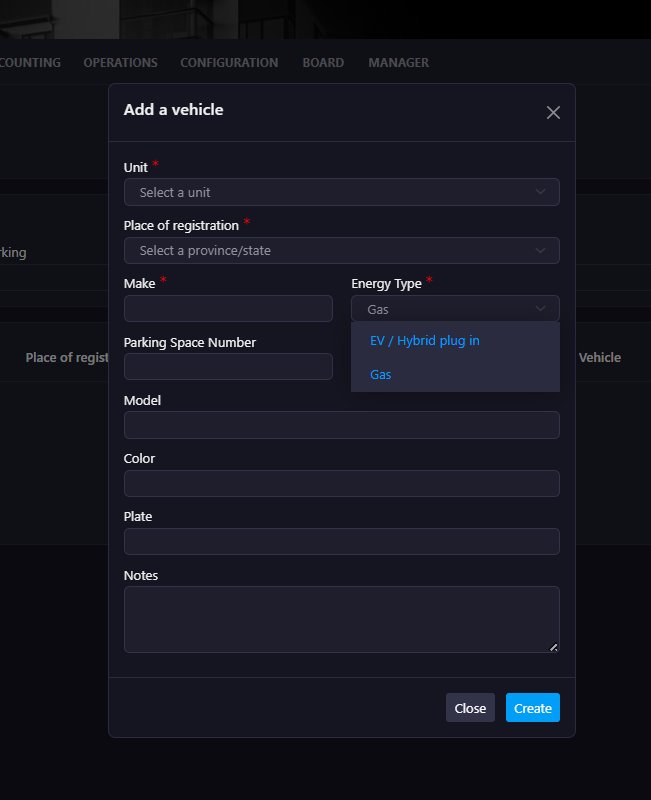
Energy Type Field
When adding a vehicle, a new required Energy Type dropdown is now available with the following options: Gas, or EV / Hybrid Plug-in. This ensures every vehicle registered in the system is properly categorized by fuel type.
Benefits
- Quickly identify which vehicles require EV infrastructure.
- Avoid confusion about vehicle types.
- Maintain accurate records for compliance and planning.
EV Plug ID
Each EV-enabled parking space now has a unique EV plug code associated with it, sourced from RVE, making it easy to identify and manage EV charging assignments.
Benefits
- Clearly link EV vehicles to specific charging plugs.
- Prevent disputes regarding charger usage.
- Simplify coordination with EV charging providers.
- Improve transparency with owners and tenants.
Parking Space Assignment
A dedicated Parking Space field captures the space where the vehicle is typically parked.
Benefits
- Easily verify which vehicle belongs to which space.
- Improve enforcement and monitoring.
- Simplify communication with residents.
Vehicle Notes
Users can now add free-text notes to any vehicle record, up to 200 characters, allowing managers to capture important details at a glance.
Example Uses:
- Confirm real EV ownership.
- Record special permissions or exceptions.
- Add internal management comments.
- Track temporary situations.
Benefits:
- Maintain contextual information directly within the vehicle record.
- Reduce reliance on external spreadsheets or manual tracking.
- Improve internal communication within the management team.
List View Enhancements
The vehicles list view now includes a Fuel/Energy Type column with filter support. Managers can filter vehicles by Gas, EV / Hybrid Plug-in, or Blank. Visual icons distinguish EV and Gas vehicles at a glance, and notes display the first 15 characters inline for quick reference.
Benefits
- Instantly identify all EV vehicles in the building.
- Quickly filter and review EV ownership.
- Support EV infrastructure planning and capacity decisions.
- Improve operational efficiency when reviewing records.
Improvements
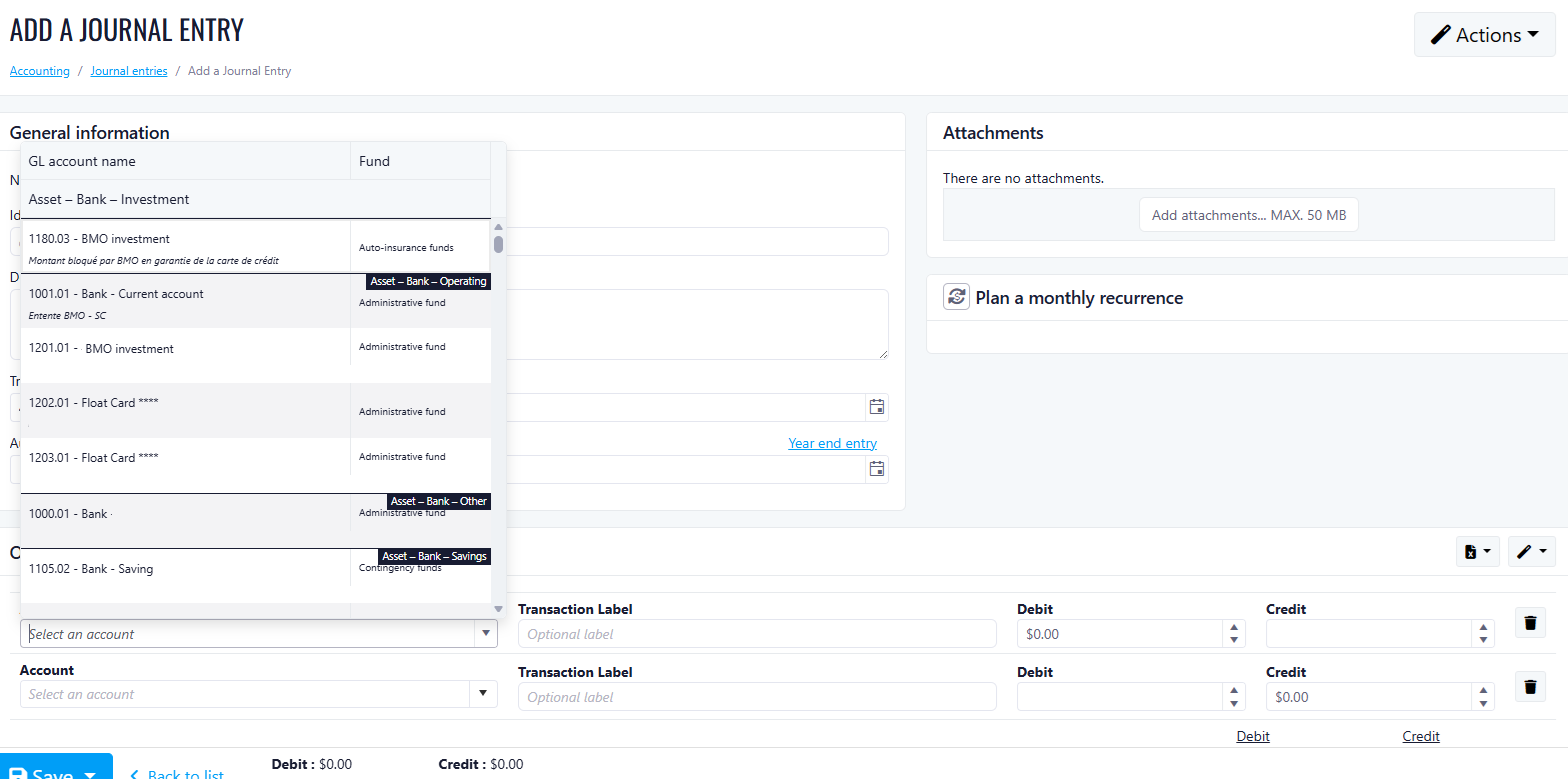
Add Accounting Number To Drop Down
What's New
- Account number is now automatically added to the Account dropdown when a new client account is created.
- Journal Entry is attached to debit/credit for validation before saving.
- Multiple line items per journal entry are fully supported with dynamic row addition.
- Line item debit and credit additions are now added
- Debit/Credit difference is displayed at the bottom of the page
Second Week Of The Month
New Features
Improved Rent Configuration for Base Rent and Services
We have enhanced the rent configuration to provide greater flexibility and accuracy when managing rent components and services associated with a lease.
Previously, the system only allowed a single option: “Included in Rent.”
This limited the ability to distinguish between base rent and services or control how charges behave during lease renewals.
What’s New
Two new configuration columns have been added:
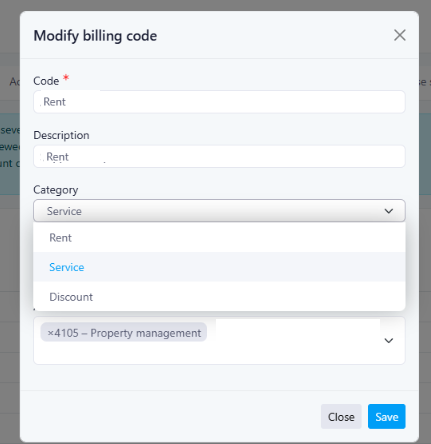
1. Base Rent or Service (Category)
This option allows you to define the category of the charge:
This helps clearly distinguish the base rent from additional services or discounts.
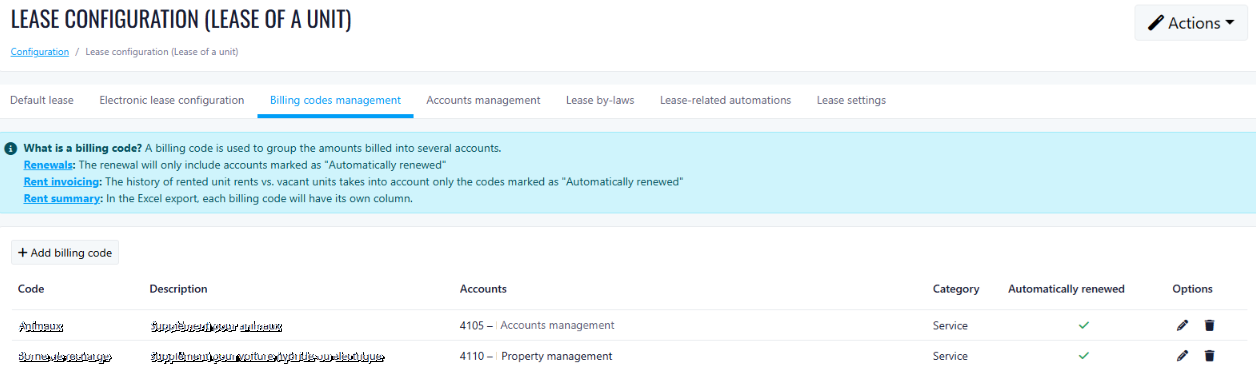
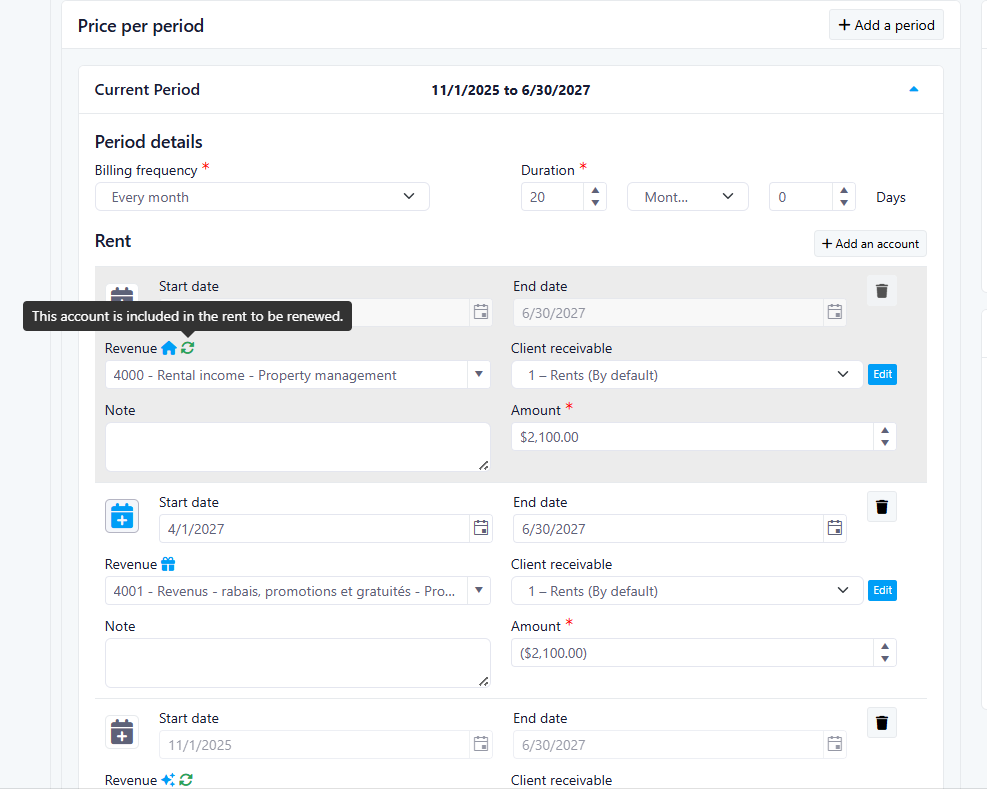
2. Auto-Renew (Carry Over to the Next Billing Period)
This setting determines whether the charge will automatically continue when the lease renews or the billing period changes.
Automatic Migration
Existing configurations have been automatically migrated to the new system:
| |
| |
| Discount and not auto renewed |
This ensures that existing leases keep the same behavior as before.
Important:
After the migration, managers should manually review their configurations and update charges where applicable. Charges that were previously configured as Rent may need to be updated to the Service category when appropriate.
Lease Interface Updates
Because the configuration now includes multiple options and categories, the lease interface icons and tooltips have been updated to better represent the different scenarios.
Renewal Logic Simplification
The renewal logic has been simplified to align with the new configuration options, making the behavior of recurring charges clearer and easier to manage.
Benefits
- Clear distinction between rent, services, and discounts.
- Greater control over charges that carry over to future billing periods.
- Simplified and clearer renewal logic.
- Improved transparency for property managers.
Special Charges Update
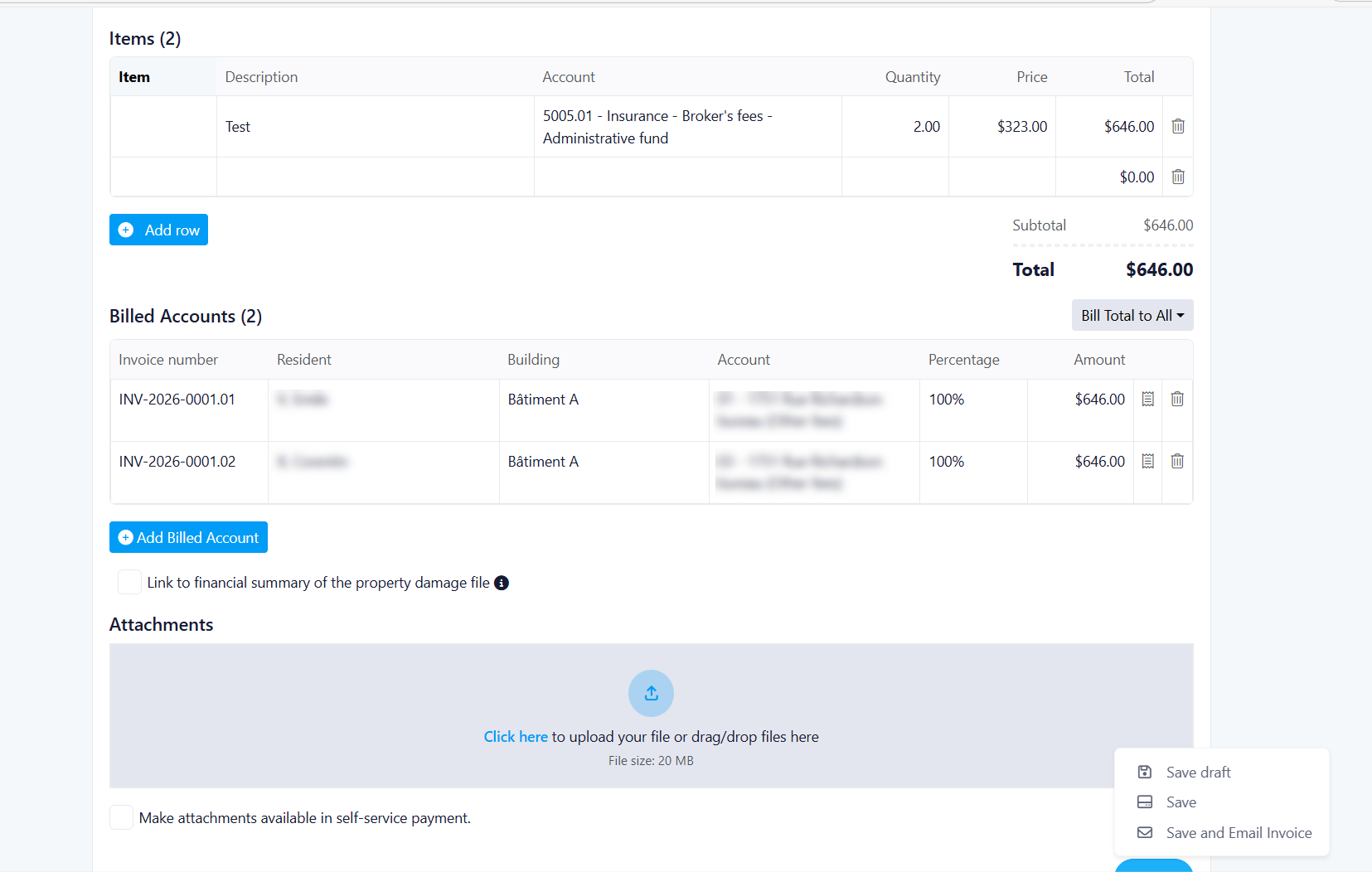
This release introduces a complete redesign of the Special Charges feature, enabling property managers to create flexible, multi-resident billing scenarios with enhanced invoice management capabilities. The new system supports custom charge allocations, improved draft workflows, and a modernized user interface.
What’s new
Auto-generated invoice numbers
Editable issue date and identifier field
Up to 20 invoice line items
Custom items or reusable saved items
Creditor and tax selection for each line item
Support for third-party billing
Billing improvements
Bill one resident for the full amount
Split charges equally across selected residents
Enter custom amounts for each resident
Real-time validation confirms totals are correct
Small rounding differences are applied automatically to the first billed account
Invoice tools
Real-time invoice preview before sending
Unique invoice number for each billed resident
Invoice PDF export after saving
Attachment support using existing business rules
Save options
Benefit
This update gives property managers more flexibility, better visibility, and improved accuracy when managing special charges.
Benefits:
Flexibility: Support for multiple billing scenarios (single, equal split, custom split)
Transparency: Clear preview of invoices before sending
Accuracy: Real-time validation ensures correct charge allocation
Efficiency: Draft saving allows work-in-progress management
Control: Property managers can customize amounts per resident
Visibility: Enhanced preview functionality for better decision-making
Event Creation Popup
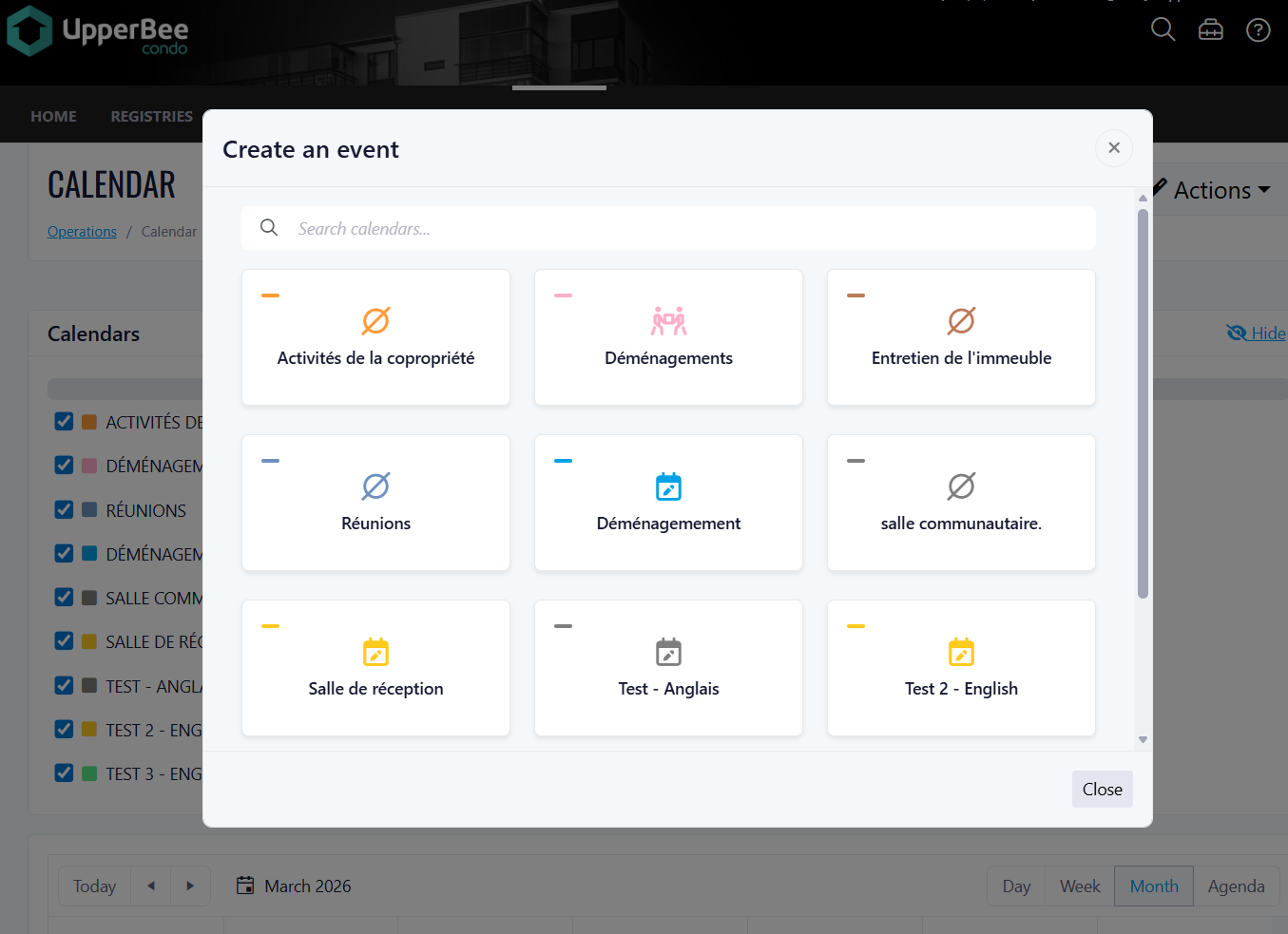
The calendar index page has been updated with a redesigned event creation popup. When clicking "Create an event", users are now presented with a modern, interactive popup that lists all calendars associated with the property, allowing them to quickly select the correct calendar and be directed to the appropriate event creation flow.
This update improves the event creation experience by providing a clearer, more visual calendar selection interface. No action is required from end users — the new popup will appear automatically for users with the feature enabled.
What's New
Redesigned Event Creation Popup
The popup has been completely revamped with a modern look and feel. It is now loaded dynamically via HTMX and managed by Alpine.js for a smooth, reactive experience.
Calendar Cards
Each calendar is displayed as a visual card inside the popup, containing:
• The calendar name and title
• A calendar icon displayed in the calendar's own color
• A color bar reflecting the calendar's theme color
• On hover: a blue outline border and a subtle upward animation, consistent with the rest of the application
Search & Filter Bar
A search bar at the top of the popup allows users to quickly filter calendars by name in real time.
Smart Redirects Based on Calendar Type
Clicking a calendar card redirects the user to the correct creation page depending on the calendar configuration:
• Calendar with reservations enabled → Ticket creation page
• Calendar without reservations → Standard calendar event creation page (createevent)
Access & Backward Compatibility
• The new popup is only visible to users who have the feature enabled.
• Users without access to the new feature are automatically redirected to the legacy event creation page, ensuring full backward compatibility.
• The previous popup remains supported for users on the legacy flow.
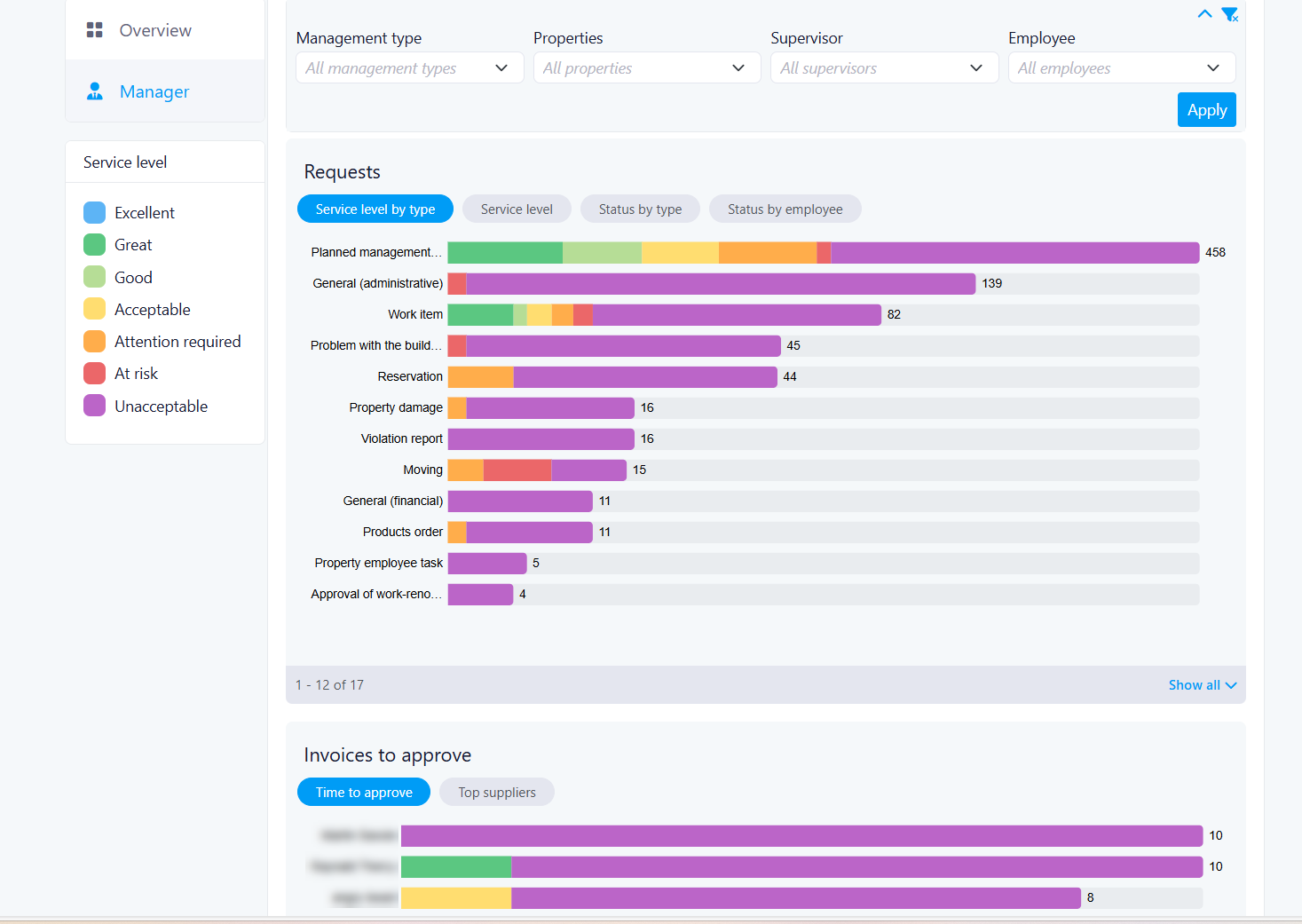
Dashboard V1: Manager Level ( BETA )
We are excited to introduce Dashboard V1, a new unified visibility experience for managers and staff across all properties.
Goal
Dashboard V1 provides real-time operational snapshots, giving managers instant awareness of what's happening across their properties right now.
- Key objectives: Consolidated dashboard with key metrics from all properties, with built-in filters to switch between them
- Real-Time Status Snapshots: Focused on current operational status
- Cross-Property and Employee Comparison: Compare employee performance within a single property using filtering capabilities
- Access Control Management: Managers can grant or remove dashboard access on a per-user basis
Giving Access
A Manager (at the company level) can grant or remove dashboard access by editing the employee record in the system.
- Any employee type can be given access for V1
- Access is granted per dashboard type (e.g., Manager Dashboard, Accounting Dashboard)
- If a user is not given access to a dashboard, they will not see the option to view it
- Default filters will show all employees
Users navigate between the following dashboard pages:
- Overview V1(default for all)
- Manager
Benefits
Managers have full control over who sees what. By granting access only to the relevant dashboards, organizations ensure that sensitive operational data stays in the right hands; reducing information overload for staff and protecting data confidentiality across the company.
Types of Dashboards in V1
Manager Dashboard:
Related to staff and operations across all properties. Staff Management is pre-filtered by the user to see which operations are due
Overview of operations by group/individual per property. Can select one or multiple properties. Can filter by group of employees.
Benefit for users:
Having specialized dashboards means each user sees a view relevant to their role — managers get staff performance insights, while all users get a clean property-level overview without clutter or irrelevant data.
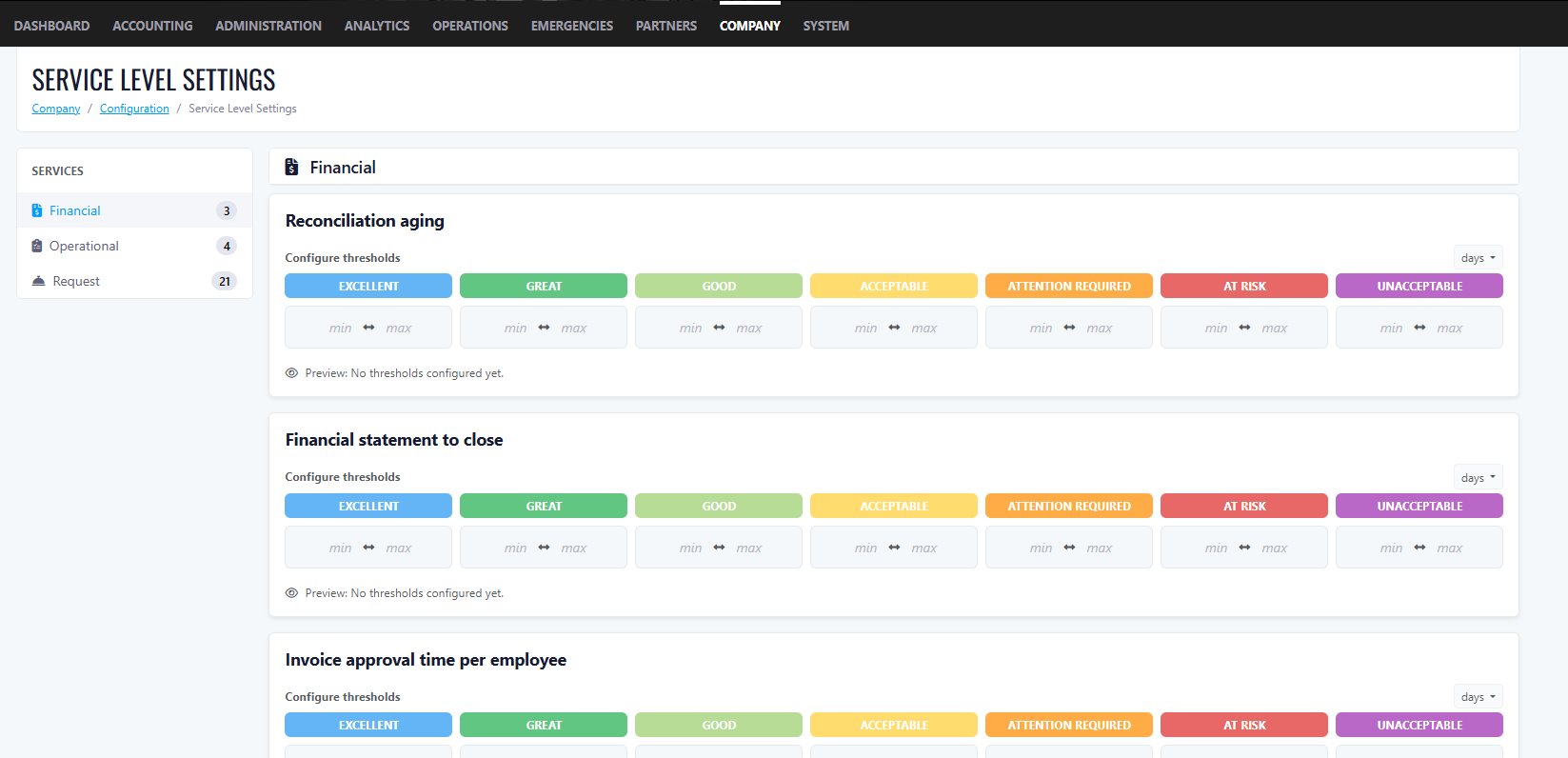
Service Level Settings (SLS)
Service Level Settings allow the company to configure performance thresholds for key metrics on the dashboard.
Values apply across all properties (universal settings)
Values are numbers only. Units are Days or QTY; no letters allowed.
The Company Owner must configure values from the configuration page
Not all dashboard metrics require SLS numbers.
If no SLS values are configured on first login, the dashboard will still display data but with only 1 colour
Users can have a 0 value between ranges.
Benefit for users:
SLS thresholds turn raw numbers into meaningful, color-coded signals. Instead of manually interpreting data, managers can instantly see whether a metric is Excellent, Fair, or Critical — making it much easier to prioritize actions and hold teams accountable to consistent standards across all properties.
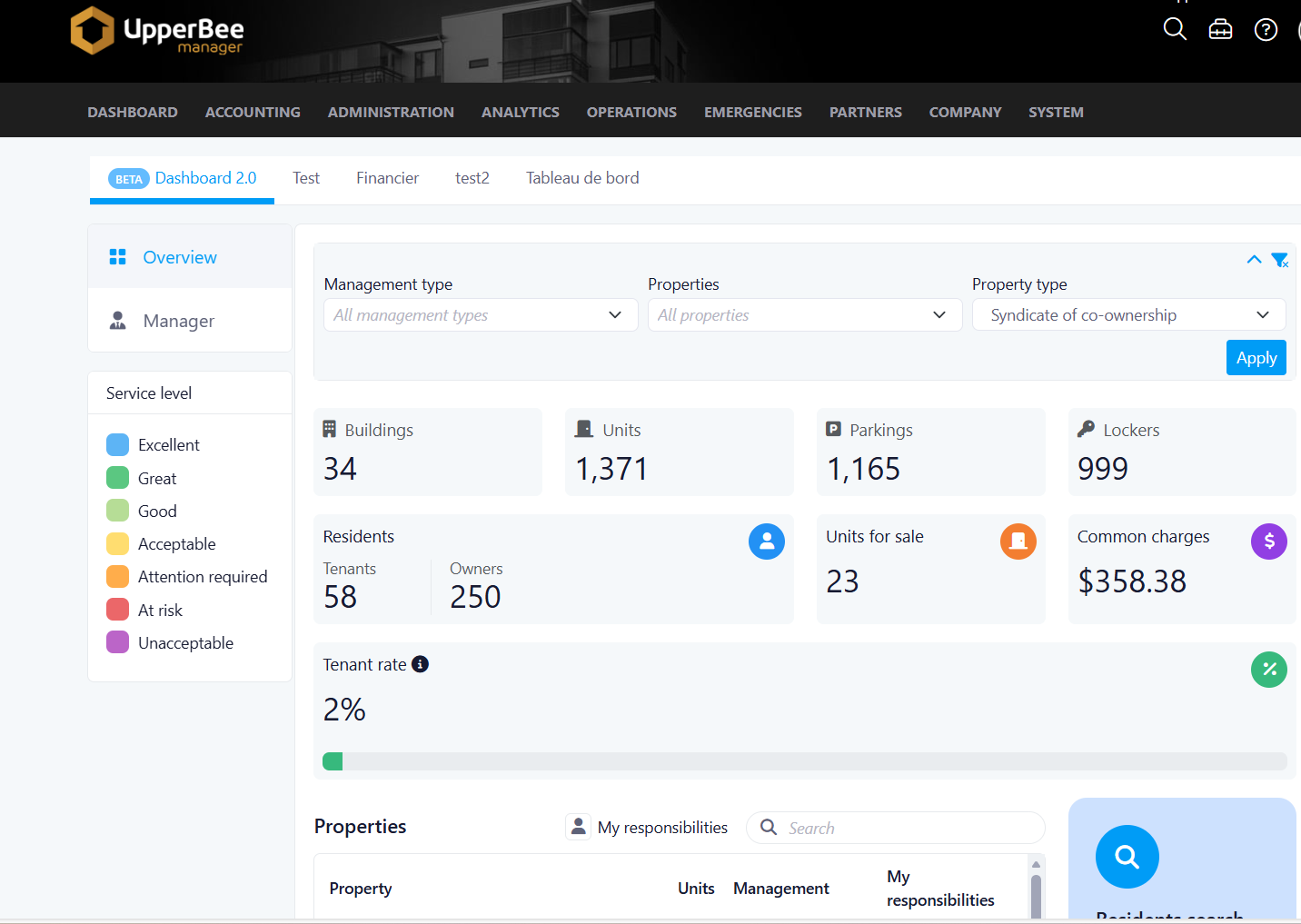
Overview Dashboard
- Default for all users.
- Users can filter by Property, which dynamically updates all numbers. Default shows all buildings.
Benefit for users:
This is the first screen every user lands on, giving an immediate, company-wide pulse check. No setup required.
Users get instant visibility into occupancy, unit counts, tenants, and their personal task list the moment they log in.
Filter Options
- Filter by Property: Shows all properties by default; updates numbers on selection.
- Filter by Property Type: Condo or Rental
Rental KPIs (Boxes)
- Number of active buildings / units / parking / lockers (updates with property filter)
- Number of tenants (updates with property filter)
- Units for Rent (updates with property filter)
- Average unit rent (updates with property filter)
- Occupancy Rate: % of units with tenants
Condo KPIs (Boxes)
- Number of active buildings / units / parking / lockers (updates with property filter)
- Number of tenants vs owners (updates with property filter)
- Units for sale (updates with property filter)
- Average condo fee monthly (updates with property filter)
- Occupancy Rate: % of units rented
Benefit for users:
KPI boxes update dynamically when filtering by property or property type, meaning managers no longer need to run separate reports for each building. A portfolio manager overseeing both Condo and Rental properties gets the right KPIs for each context in a single click.
Bottom of Page (Both Rental & Condo)
- Properties table: Property Name, # of Units, Type, My Responsibilities. Filterable by "My Responsibilities" toggle.
- Search Residents: Search across all properties; results redirect to the resident page.
- My Tasks / Task & Actions: List of open tasks and action items.
Benefit for users:
The "My Responsibilities" filter lets staff focus only on the properties they manage, reducing noise. The Resident Search consolidates a previously multi-step process; users can now find any resident across all properties from one central location. The My Tasks section ensures nothing falls through the cracks by surfacing pending items directly on the home screen.
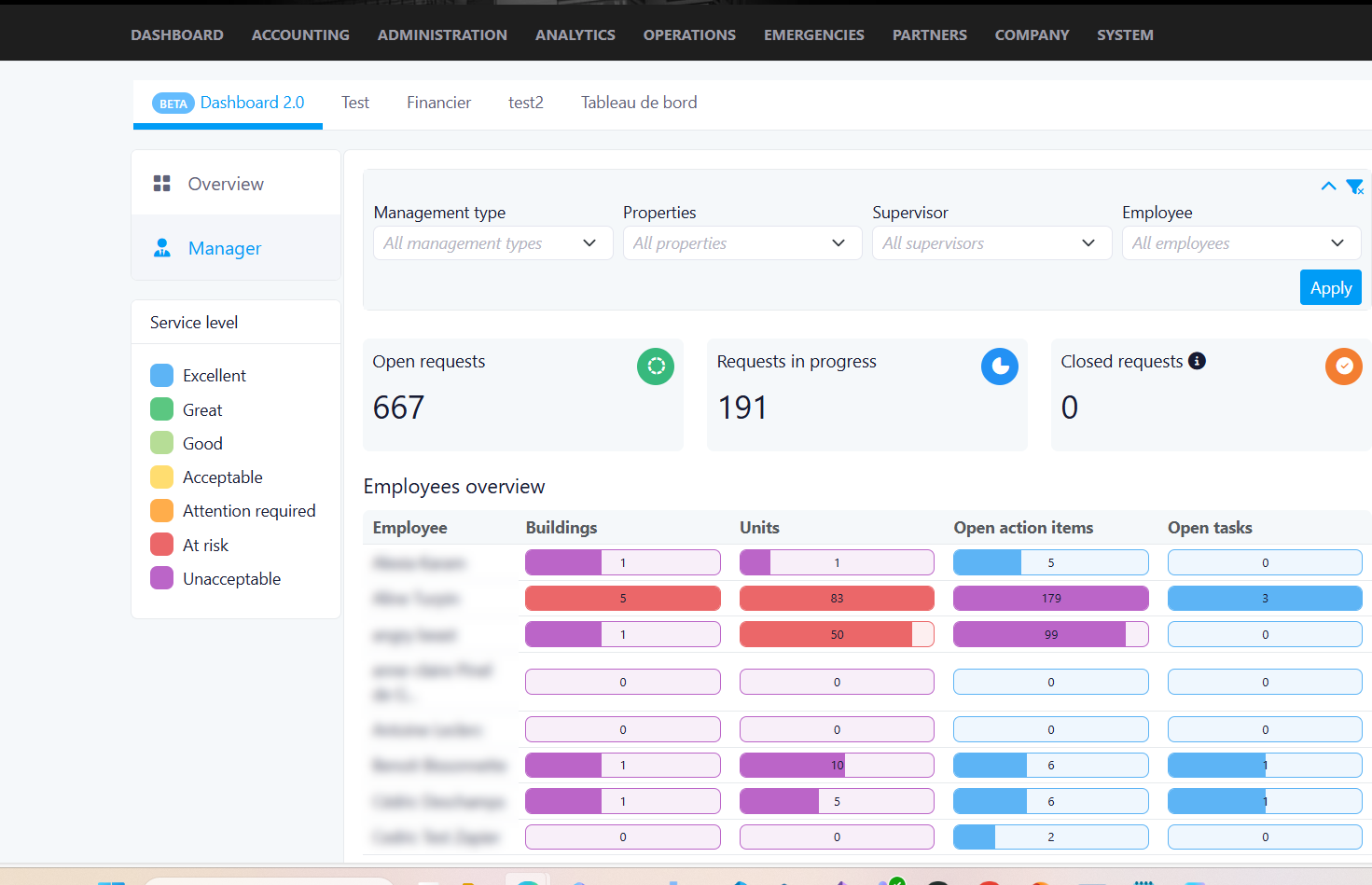
Manager Dashboard
This dashboard replaces the need to manually compile performance data from multiple reports. Managers get a live, filterable view of workload distribution, ticket backlogs, and invoice delays across their team, enabling proactive management and fair performance reviews.
Filters
- Supervisor: Select specific employees (multi-select) or all team members under a supervisor.
- Property: Select all or multi-select. Includes Management Type filter.
Benefit for users:
Multi-select filters give managers the flexibility to zoom in on a single employee, a specific team, or compare across the entire company, without leaving the dashboard or running separate queries.
KPI Boxes
- Total Number of Open Tickets (new tickets with no status update, not closed)
- Total Number of In Progress Tickets
- Total Number of Closed Tickets
Benefit for users:
At a glance, managers can assess the overall health of their operations. A high number of open tickets with no status update signals stalled work and lets managers intervene quickly before issues escalate.
Metrics
- Number of buildings managed by employee: Primary property manager; list of employees with number of properties.
This quickly identify if workloads are unevenly distributed — helping managers rebalance responsibilities and prevent burnout.
- Number of units per employee: Primary managed units.
This provides a clearer picture of each employee's operational footprint, making capacity planning easier and more objective.
- Action Items: Number of open action items per employee (excludes Closed)
Managers can see who has a growing backlog of unresolved items and follow up before deadlines are missed.
- Task Items: Number of open tasks per employee by days (excludes Closed)
Tracking tasks by days open highlights aging items. This helps managers prioritize escalations
- Open Ticket By Status: Graph displaying ticket statuses (excludes Closed).
Shows total ticket count and status breakdown by ticket type (Admin, Common Area, Financial, etc.), helping managers spot which service categories are most overloaded, enabling smarter resource allocation
- Open Ticket Status By Employee: Graph by employee showing total tickets and status (excludes Closed)
- Invoices to Approve: Broken down by days outstanding. Tabs: Time to Approve / Top Suppliers.
Highlighting invoices by how long they've been waiting for approval helps managers prevent late payment penalties and maintain healthy supplier relationships. The Top Suppliers tab adds context on which vendors generate the most invoice volume.
Improvements
SMS – Change Phone Number to Improve Deliverability
We updated the phone number used for SMS sending to help improve message deliverability and reliability.
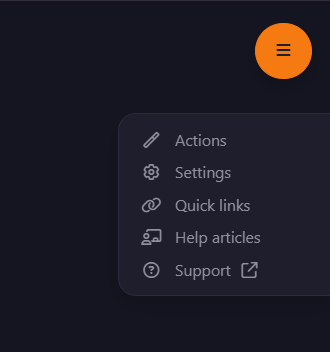
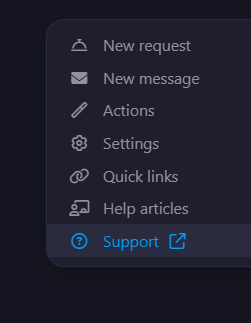
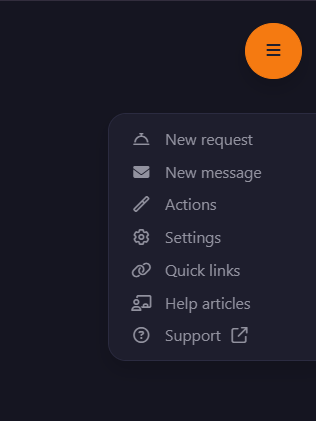
Improved Quick Links Navigation
The Quick Links menu has been updated to make it easier and faster for users to access the most relevant actions and support resources.
Key Improvements
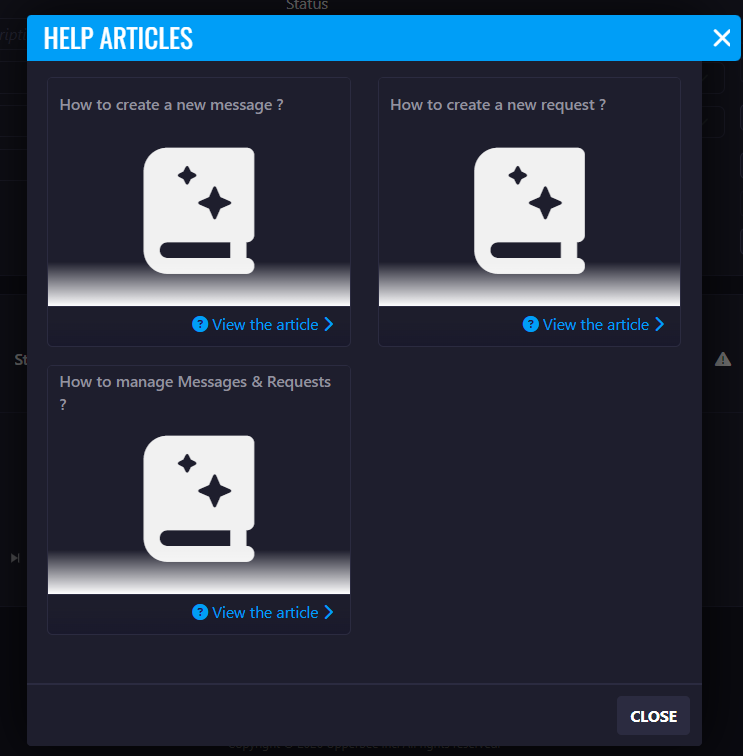
1. Help Articles Access
- A new Help Articles option has been added to the Quick Links menu.
- This option will appear only when help articles are available for the page.
Benefit:
Users can now quickly access relevant documentation and guidance without leaving the page.
2. Permanent Support Access
- A Support option is now always visible in the Quick Links menu.
Benefit:
Users can contact support at any time if they need assistance.
Improved Quick Links Order
The Quick Links menu has been reorganized to prioritize the most relevant actions.
New behavior:
- If a page contains New Request and New Message, these actions will appear first in the list.
- If these actions are not available, Action will appear as the first item.
- Help Articles and Support will always appear as the last two options in the menu.
Benefit:
This new order highlights the most frequently used actions, helping users complete tasks faster and improving navigation efficiency.
Task Visibility from Messages & Requests
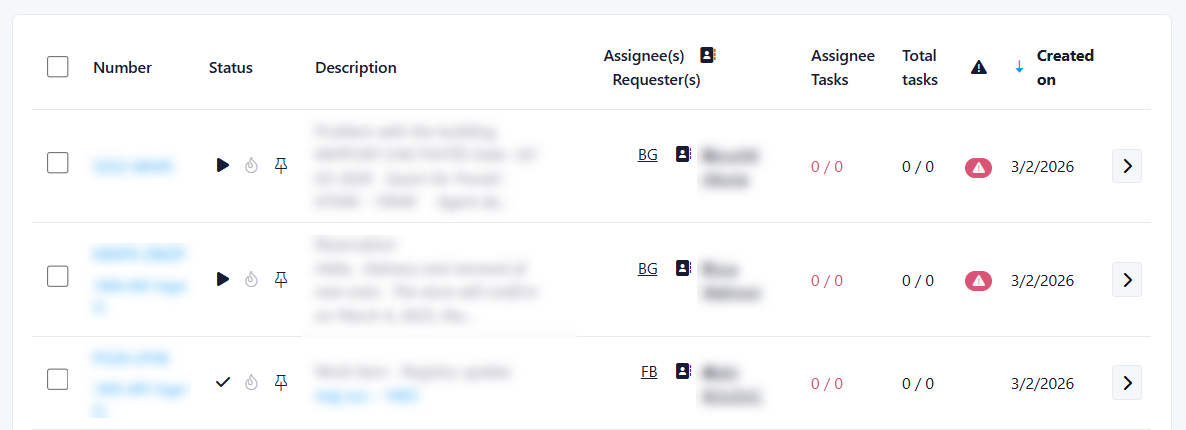
We’ve improved how tasks are displayed to help property managers quickly understand what requires their attention—directly from the Messages & Requests screen.
What’s New
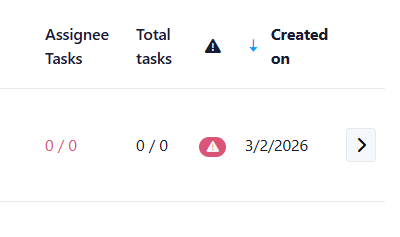
1. New Task Columns in Requests
Two new columns have been added to the request list:
Assignee Tasks
Displays the number of tasks assigned to you for a specific request.
Format example: 1/3
- 1 = tasks assigned to you
- 3 = total open tasks assigned to you for this request
Total Tasks
Displays the total number of tasks linked to the request, regardless of assignee or status.
Key Benefit:
You can instantly understand your workload and the overall effort required for each request—without opening it.
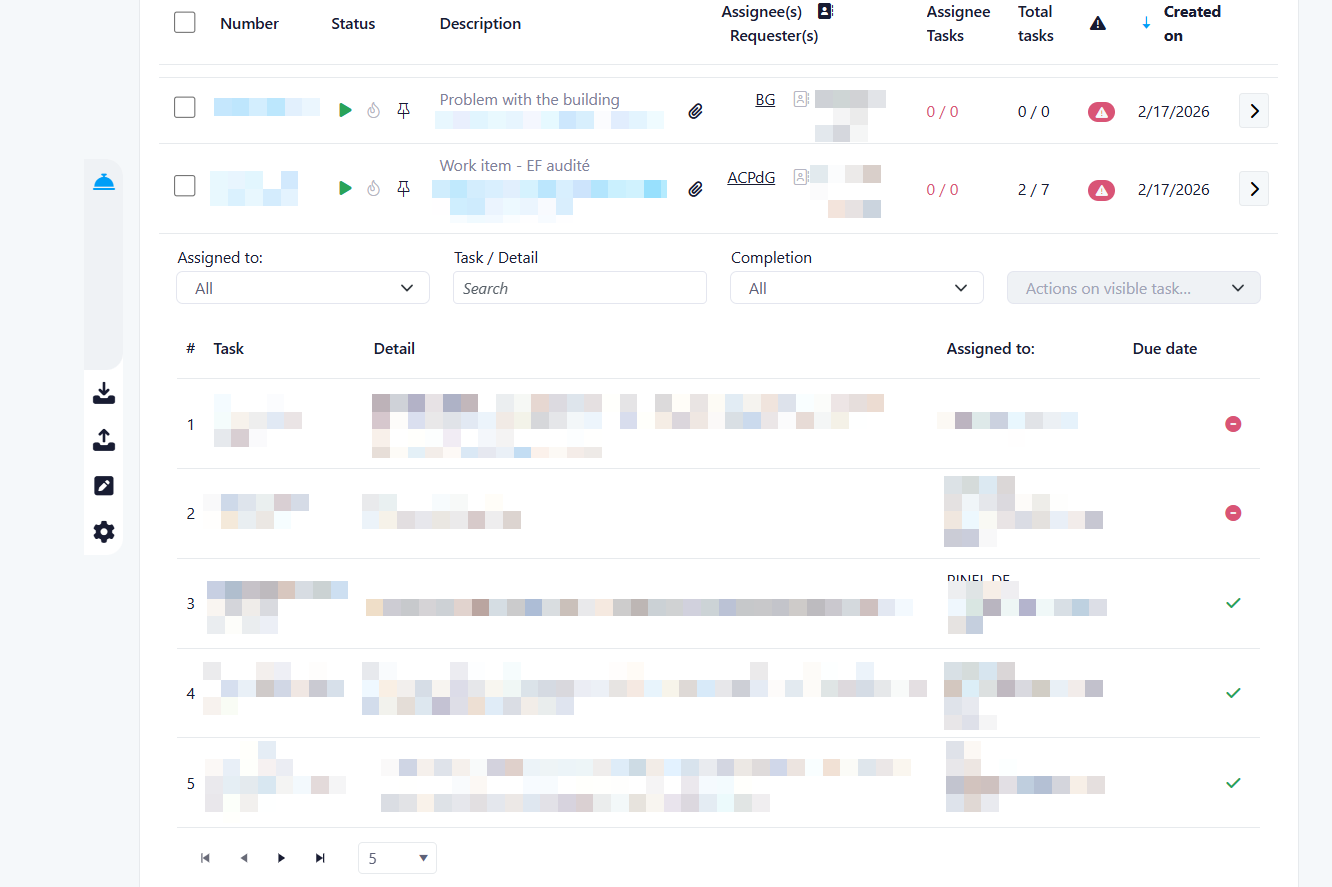
2. Quick Access to Task Details
The Assignee Tasks value is now clickable.
When clicked:
- A panel opens showing the list of tasks related to the request
- The display is consistent with the existing task management view
Permissions:
- You can view all task details
- You can only update tasks assigned to you
- You can mark your tasks as completed using the checkmark, as usual
Key Benefit:
Access and manage your tasks faster, directly from the request list—no need to navigate to another page.
3. Updated Naming for Clarity
To improve consistency and clarity:
- “My Tasks” has been renamed to “Assignee Tasks”
Key Benefit:
Clearer terminology that better reflects task ownership.
4. Improved Default Task View
The default task view has been enhanced to give better visibility on pending work.
Now displayed by default:
- Tasks assigned to you
- All unassigned tasks
Previously:
- Only tasks assigned to you were visible by default
Additional behavior:
- Newly created unassigned tasks will automatically appear in the list
Key Benefit:
You can immediately identify tasks that require assignment, helping your team respond faster and avoid missed work.
Summary of Benefits
- Faster understanding of workload per request
- Direct access to task details from Messages & Requests
- Improved visibility of unassigned tasks
- More intuitive and consistent terminology
- Better team coordination and task management
Third Week Of The Month
New Features
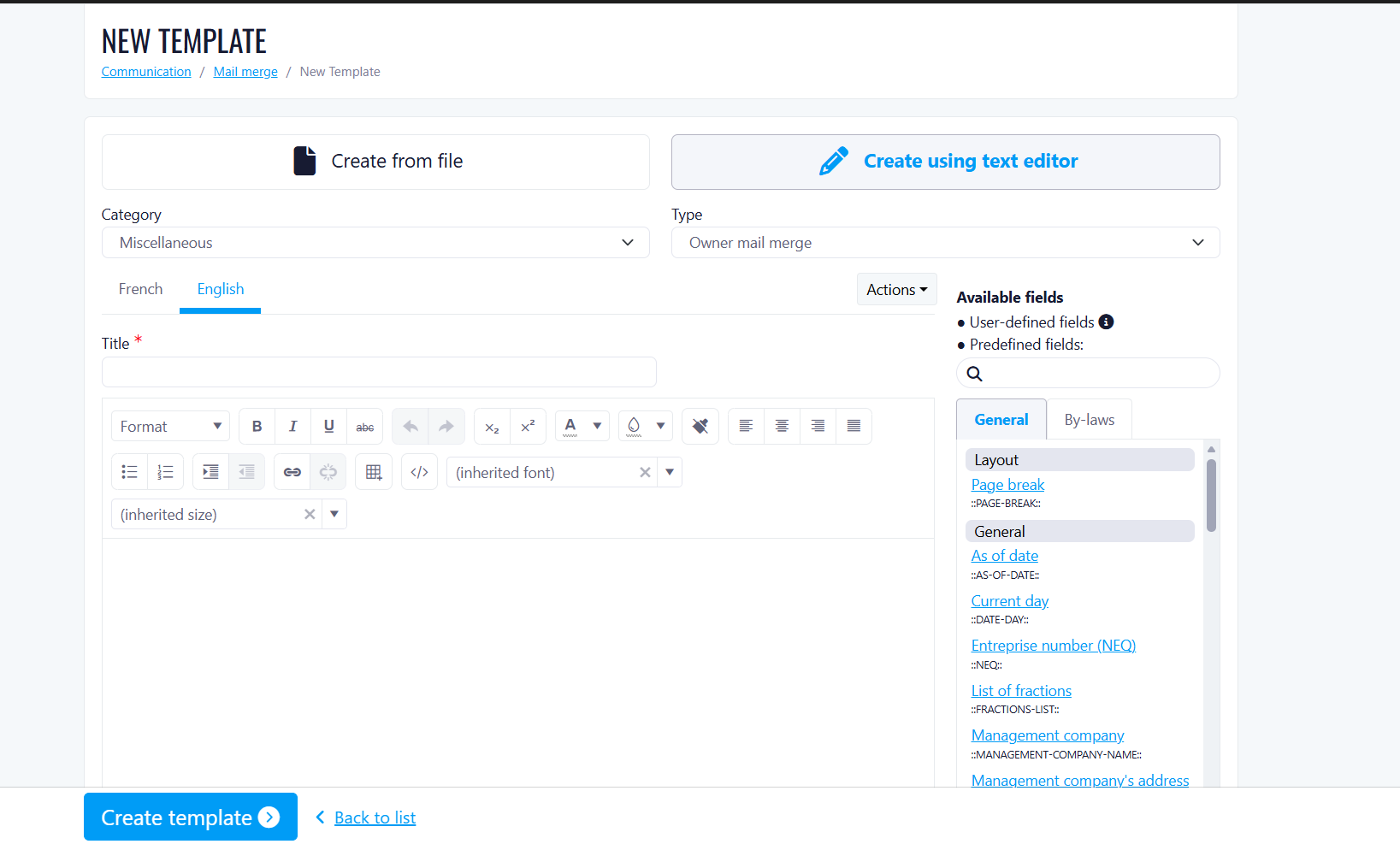
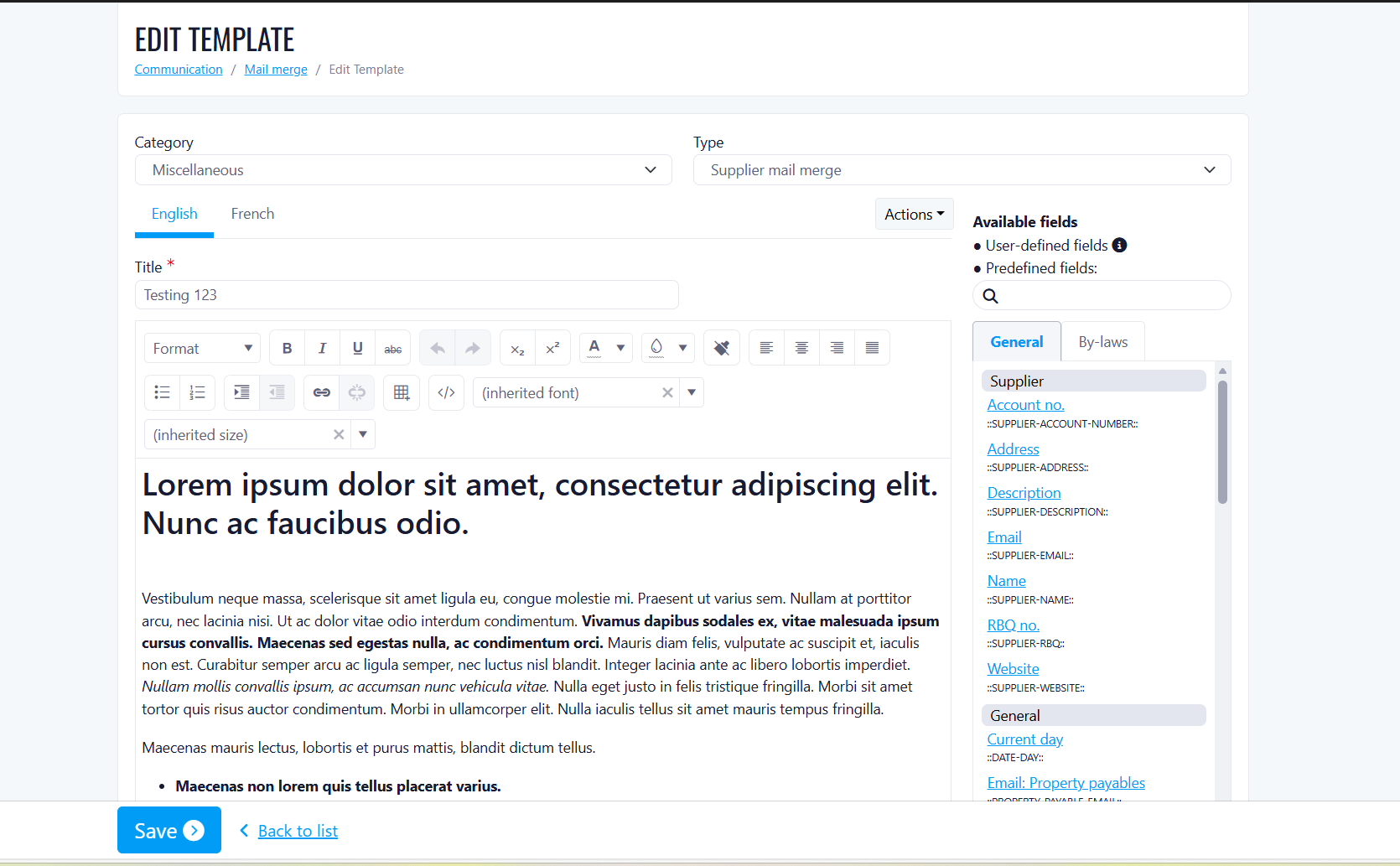
In-Page Document Editor for Property Mail Merge Templates
Mail merge templates at the property level can now be edited directly within the page. Previously, users were limited to uploading and downloading template files — the document editor that was already available at the company level has now been brought to the property level as well.
Before this release
Users could only upload a .docx template file and download it back to make edits locally.
Any change to a template required leaving the platform, editing the file externally, and re-uploading it.
With this release
A full document editor is now embedded directly on the property template page.
Users can create, view, and edit mail merge templates without ever leaving the application.
The experience is consistent with the existing company-level template editor.
Who is affected
Users who manage mail merge templates at the property level.
No action required, the editor is available automatically on the property template page.
Short Term Rental & Reservation Management
We are pleased to introduce our enhanced Short-Term Rental and Reservation Management functionality.
This release delivers a fully centralized booking experience for condo owners and tenants, while providing property managers with advanced configuration tools and operational automation.
How the New Functionality Works
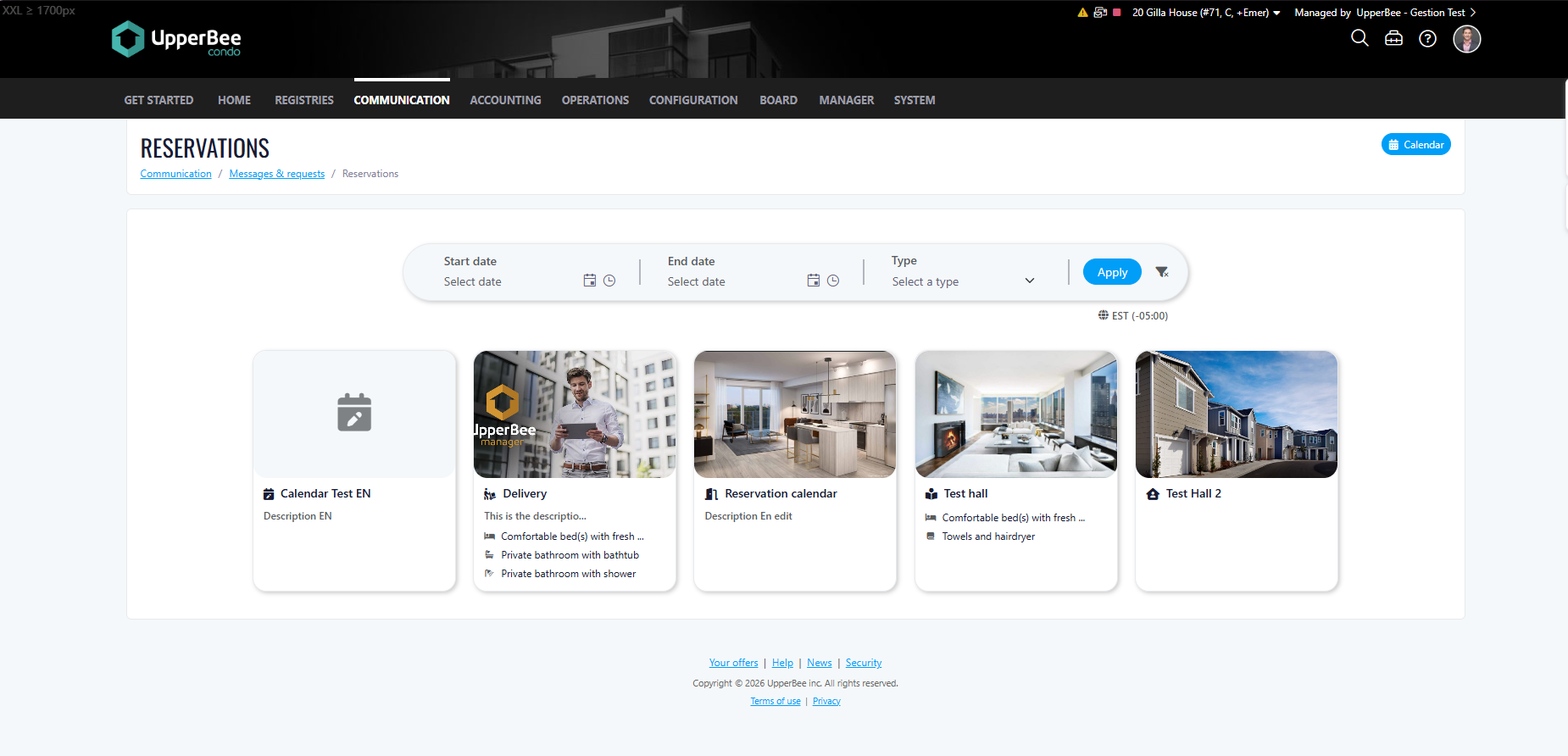
Centralized Reservation Experience
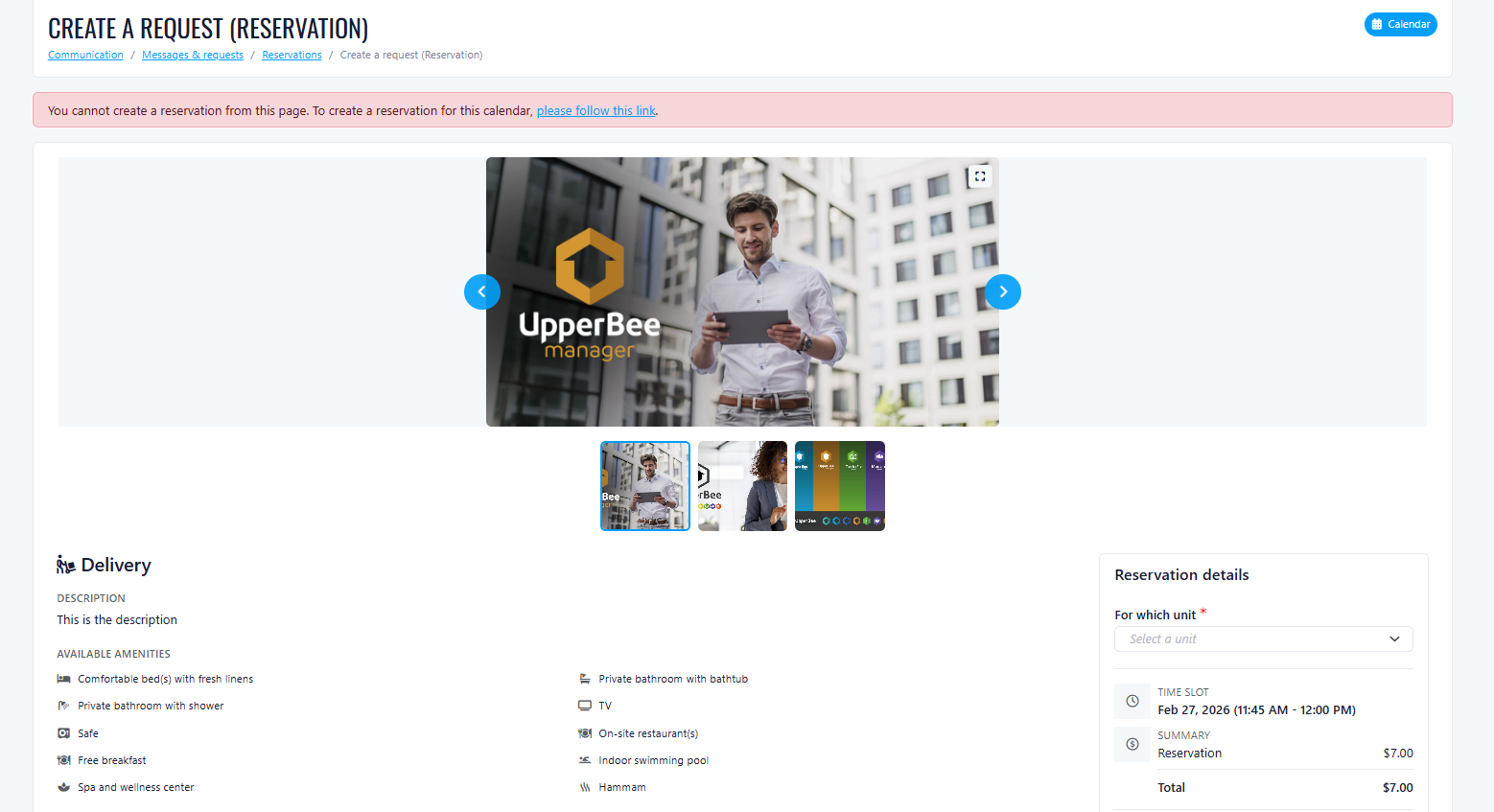
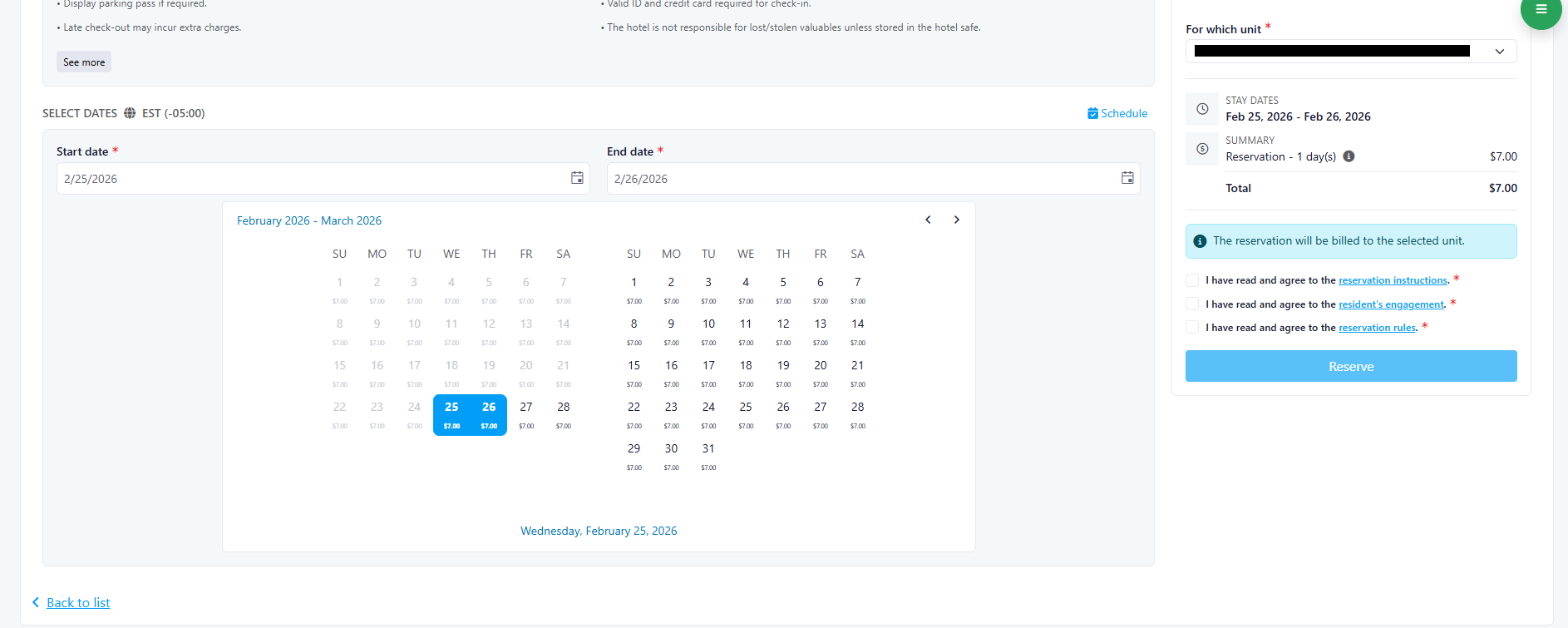
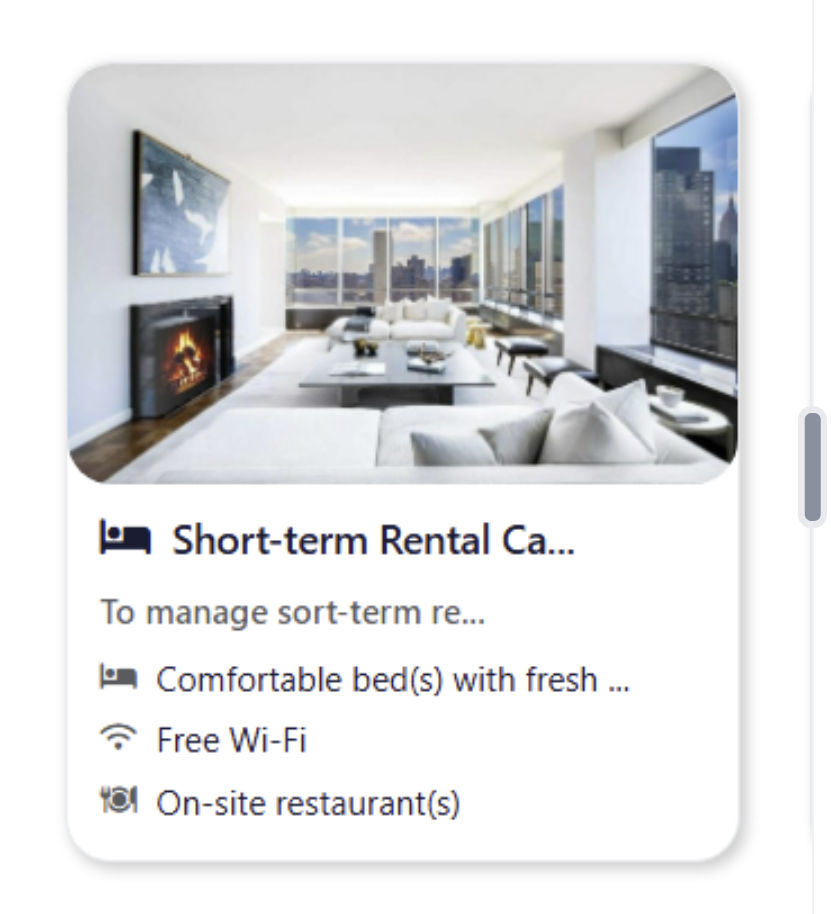
When a user clicks on the Reservation tile, they are redirected to a dedicated Reservation Landing Page displaying all available listings in one centralized view.
The landing page includes:
• Reservation type filters (Stay or Daily — both selected by default)
• A calendar-based date selector
• Real-time availability results that update dynamically
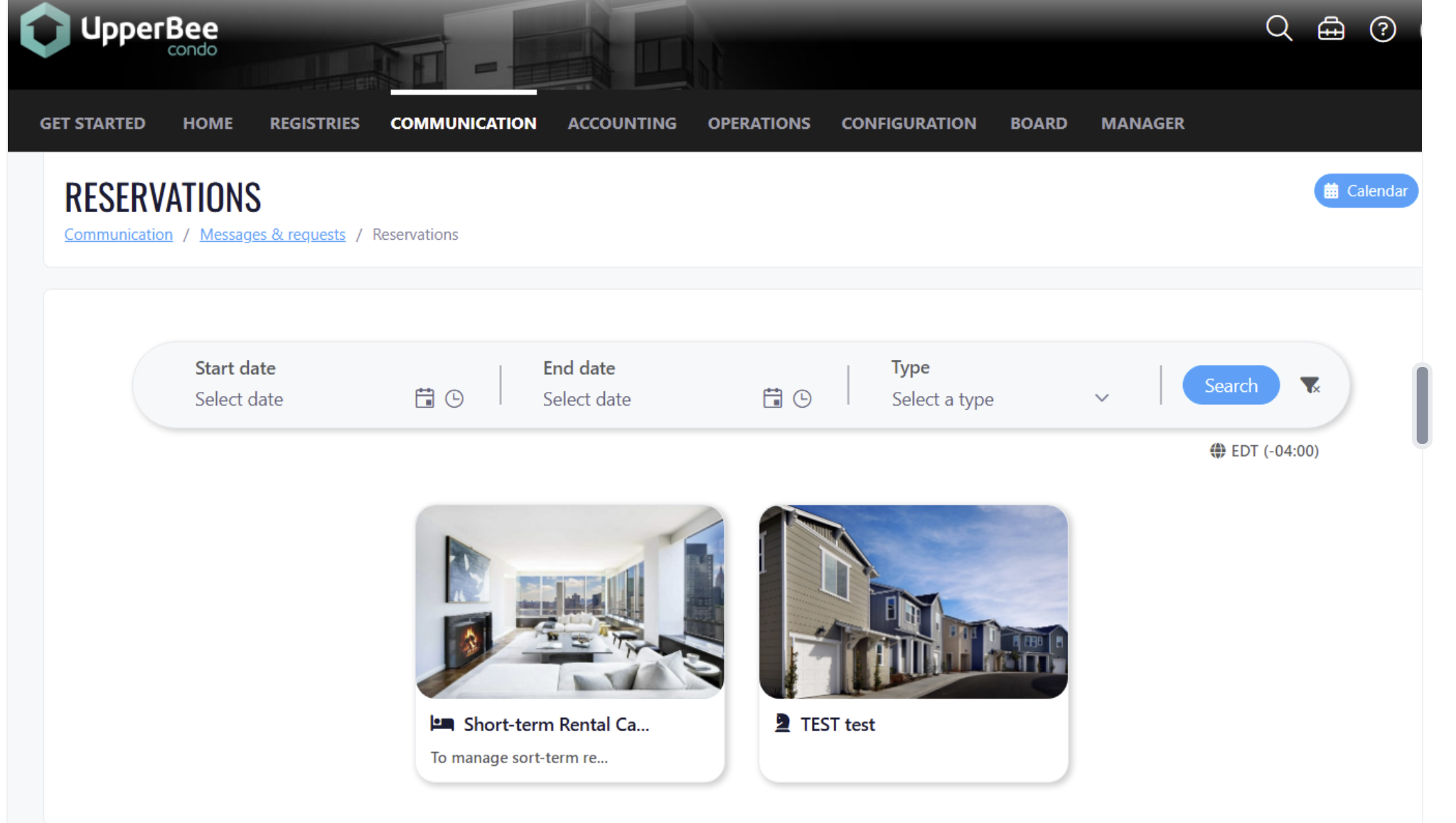
Each listing is displayed in a clear, card-based layout showing:
• Unit name and description
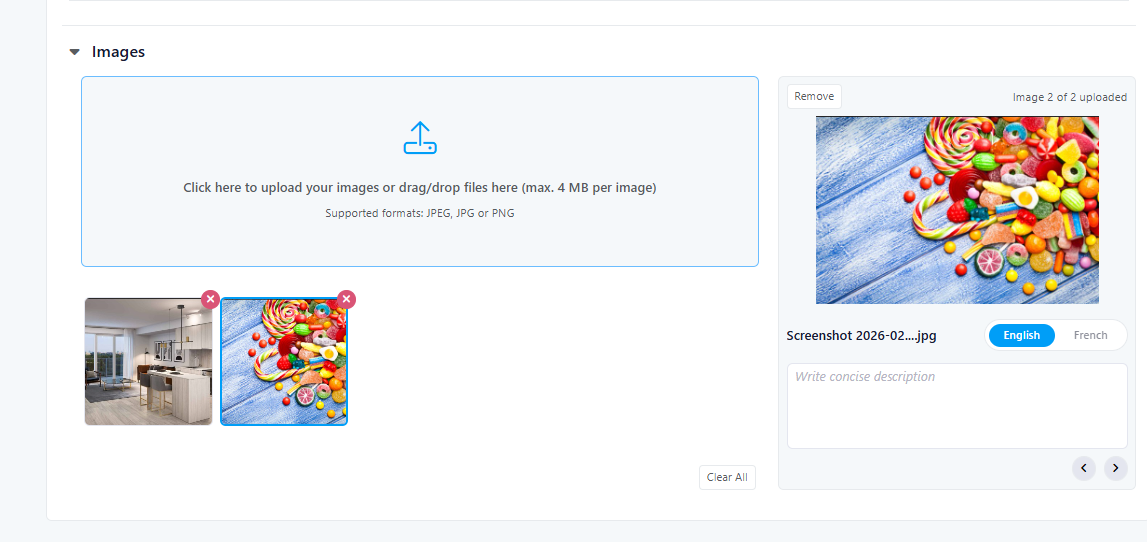
• Default image (or “Coming Soon” placeholder if no images are uploaded)
• Dynamic pricing based on selected dates
• Check-in and check-out times
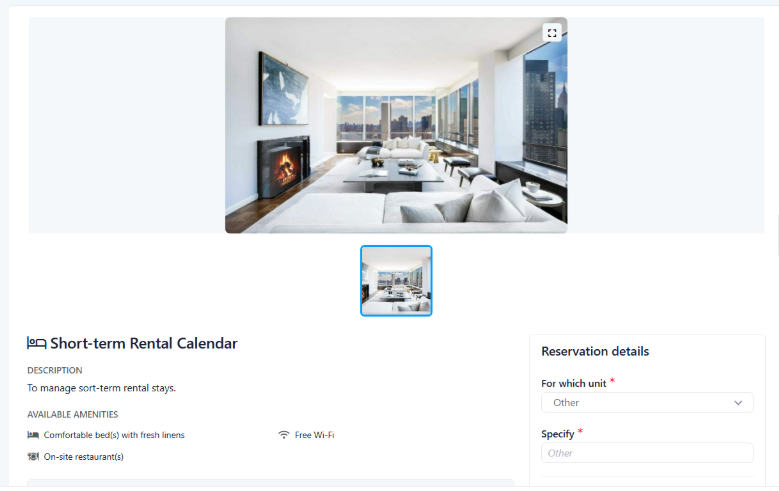
When selecting a unit, users can:
• Review a detailed price breakdown
• View all images
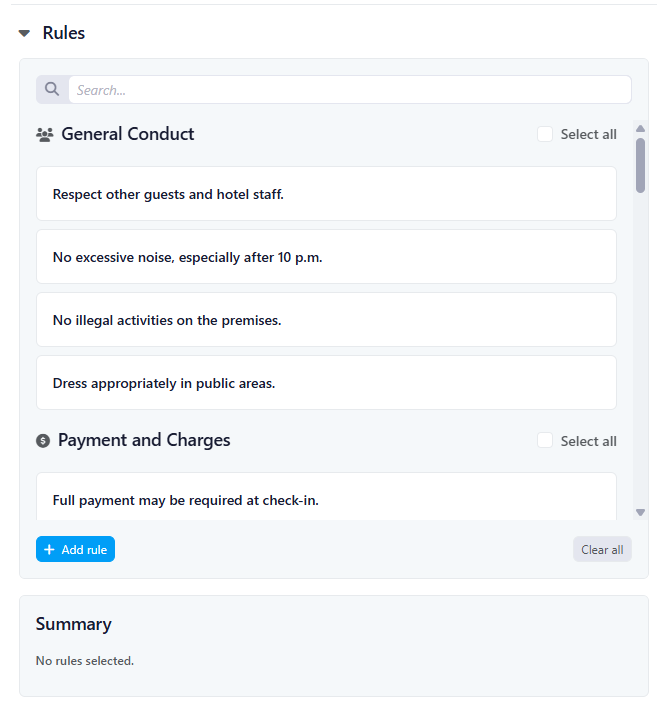
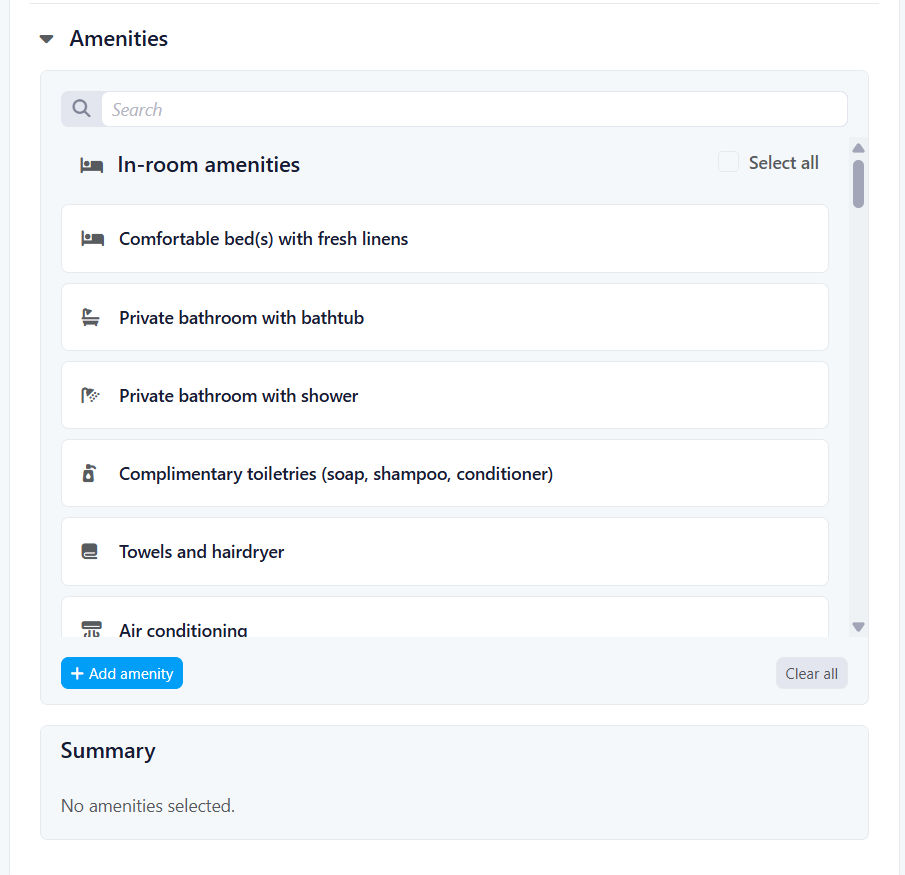
• Review rules and amenities
• Confirm availability
• Complete the reservation and payment
The interface is designed to be intuitive, transparent, and efficient, enabling users to make informed decisions before confirming their booking.
For Condo Owners
Condo owners benefit from greater visibility and flexibility.
Key Features
• Real-time availability search
• Calendar-based booking
• Dynamic pricing by day of the week
• Full price breakdown before confirmation
• Image gallery with descriptions
• Option to pay by credit card or be billed to their condo (if enabled)
• Ability to reserve directly via the portal
Benefits
• Faster booking process
• Clear pricing transparency
• Improved user experience
• Reduced reliance on manual coordination
For Tenants
Tenants can now book short-term rentals through a simplified and secure experience.
Key Features
• Real-time availability
• Calendar date selection
• Clear price breakdown
• Image viewing
• Secure credit card payment (mandatory)
Benefits
• Immediate booking confirmation
• Secure transactions
• Simple and streamlined reservation process
For Property Managers
This release introduces powerful administrative tools designed to increase efficiency and control.
Listing Management
• Create new listings using templates
• Duplicate existing properties quickly
• Upload up to 10 images per unit
• Add image descriptions (maximum 50 characters)
• Drag-and-drop image reordering
• Automatic “Coming Soon” image if none uploaded
• Optional location label display
• Add blackout dates
• Configure maximum booking duration (default 7 days, adjustable)
• Set check-in and check-out hours (default 4:00 PM / 11:00 AM, adjustable)
• Configure fixed deposit amount (default $500, adjustable)
• Enable or disable deposit requirement
Dynamic Pricing
• Flexible day-based pricing configuration
• Revenue optimization opportunities
Calendar & Reservation Management
• Centralized booking calendar
• Clear identification of check-ins and check-outs
• Reservation status visibility
• Housekeeping status tracking
Rules & Amenities Configuration
Managers can standardize and customize property details:
• Select predefined bilingual rules
• Add custom rules (40 characters title / 100 characters description)
• Select predefined amenities
• Add custom amenities
• Organize by category
Benefits include:
• Clear guest expectations
• Reduced disputes
• Professional presentation
• Greater operational consistency
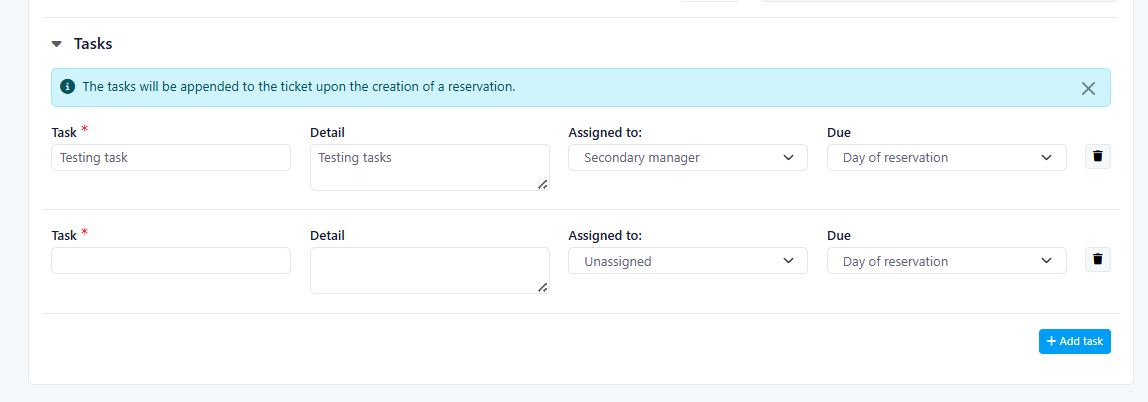
Automated Task List Creation
Operational efficiency is enhanced through automated workflows.
When a reservation is created:
• A request/ticket is automatically generated
• A task list can optionally be added
• Due dates can be configured as:
- Calendar-selected date
- 24 or 48 hours before reservation
- 24 or 48 hours after reservation
- Start date of reservation
Tasks follow existing backend specifications.
Benefits
• Improved operational planning
• Better housekeeping coordination
• Reduced manual follow-up
• Clear accountability and deadlines
Overall Client Value
This enhancement delivers:
• Real-time booking visibility
• Transparent and dynamic pricing
• Centralized reservation management
• Reduced manual processes
• Automated operational workflows
• Improved communication between owners, tenants, and managers
• Increased revenue optimization opportunities
This release significantly strengthens the short-term rental workflow while increasing operational efficiency and user satisfaction across all roles.
Improvements
Last Week Of The Month
New Features
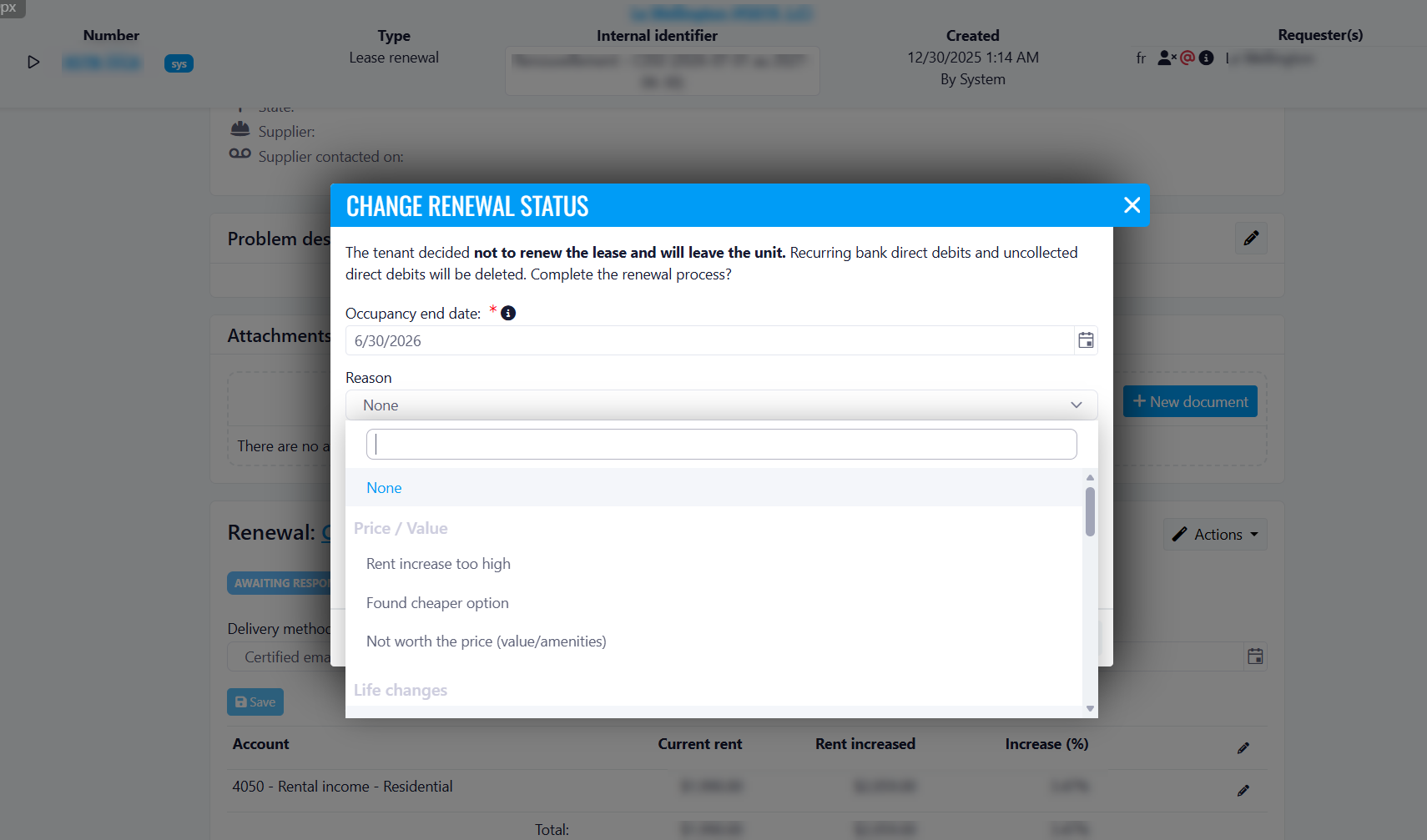
Lease Renewals - New "Other" Reason for Non-Renewal
A new "Other" option has been added to the Reason dropdown in the Change Renewal Status dialog, which is displayed when a tenant indicates they will not be renewing their lease and will be vacating the unit.
This non-renewal reason is now included in reports, ensuring that the reason entered will correctly appear in renewal reporting.
Benefits
Better data capture: No tenant departure goes uncategorized, even when the reason doesn't fit existing options.
More accurate reporting: Non-renewal reasons are fully reflected in reports, giving property managers a clearer picture of tenant turnover.
Improved decision-making: Tracking all reasons for non-renewal helps identify trends and supports more informed retention strategies.
Greater flexibility: Teams can document unique or uncommon situations without being forced into a mismatched category.
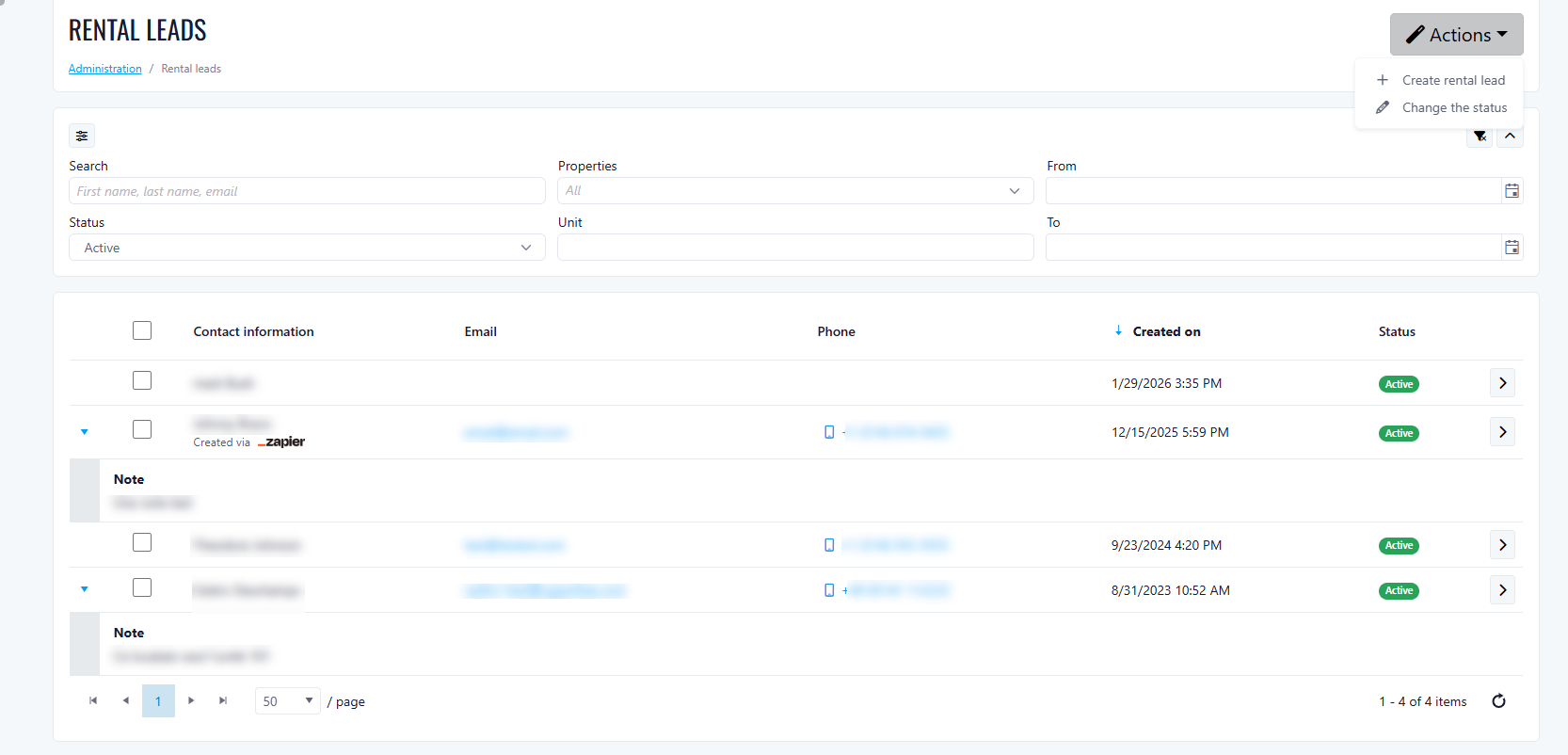
Rental Leads now available at Property Level
We are extending the Rental Leads functionality to the property level, allowing on-site teams to manage prospects directly within each property, instead of only at the company level.
What’s new
Rental Leads can now be accessed and managed directly from a property, offering a more localized and efficient workflow for leasing teams.
Key benefits
- Better visibility at property level: Manage prospects where leasing activity actually happens
- Faster follow-ups: On-site teams can act directly without relying on company-level access
- Improved organization: Keep leads tied to the relevant property and unit
- Streamlined leasing process: Easily track candidates from first contact to lease signing
How it works
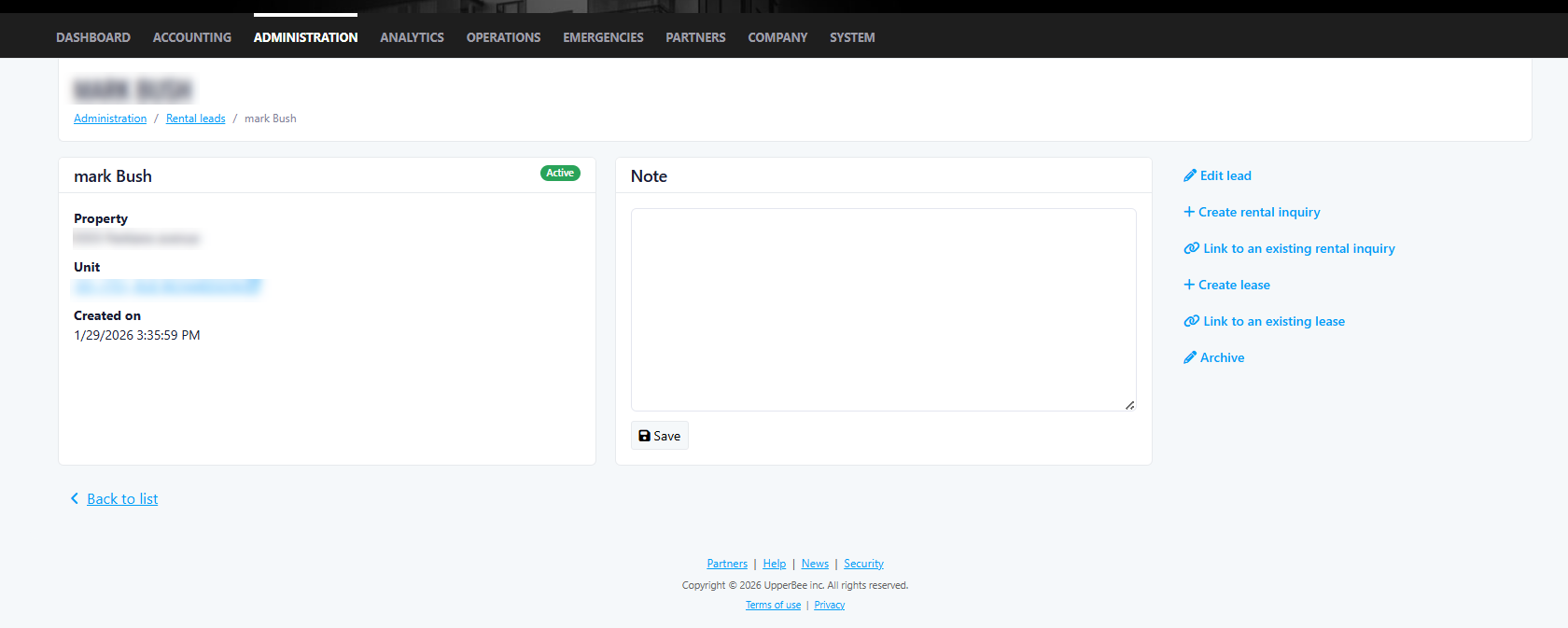
The Rental Leads module allows you to:
- View and manage all rental candidates associated with a property
- Create and update candidate profiles
- Track candidate status throughout the leasing lifecycle
- Link candidates to:
- Pre-leasing inquiries
- Leases
Availability
The Rental Leads module at property level is available only when:
- The property is rental type
- The Lease feature is enabled
- The property is managed by a management company
- The feature gate RentalLeadsProperty is enabled
Permissions
Access depends on user permissions:
- View only (
scapp.rentalleadsmanagement.view): - View candidates and details
- Manage (
scapp.rentalleadsmanagement.manage+ view): - Create, edit, and update candidates
- Change candidate status
Improvements